
Talk to a product expert
Best AI for PLM in 2026


The best AI tools for product lifecycle management (PLM) in 2026 fall into two broad categories. Native AI capabilities from Siemens, PTC, Aras, Dassault Systèmes, and Oracle operate within their respective PLM environments, while independent platforms such as CoLab integrate with multiple CAD and PLM systems to support engineering search and design review.
Manufacturers have spent decades building sophisticated systems for managing product data. But the expertise engineers rely on to evaluate a design often extends beyond those systems, from internal manufacturing guidelines to supplier experience and lessons from previous programs. AI offers an opportunity to apply more of that knowledge during development, rather than relying on engineers to find and interpret it themselves.
This guide compares seven AI for PLM tools, examining their capabilities, supported integrations, and how they help engineers use existing product data and engineering expertise to make better design decisions.
AI for PLM tools at a glance
AI for PLM spans several distinct engineering activities, from retrieving product information to preparing changes and evaluating designs.
These activities demand different information and different levels of engineering judgment. Retrieving a drawing containing a geometric dimensioning and tolerancing (GD&T) callout does not establish that a document-search assistant can assess the tolerance. Likewise, identifying two geometrically similar parts does not establish that they are interchangeable.
PLM assistants and workflow agents
1. Siemens Teamcenter Copilot
For teams already managing product records in Teamcenter, Teamcenter Copilot offers document questions with answers linked to supporting records. Siemens describes access controls that follow those of the underlying data, along with the ability to search individual files or collections. The practical test is whether the response points to the correct revision and configuration, particularly when older documents contain similar terminology.
The Teamcenter 2606 release extends this into controlled work on product data. Its BOM agent can propose and carry out changes under human oversight, while other capabilities assist with requirements and manufacturing planning.
These workflows deserve separate evaluation. Successful document retrieval tells you little about whether an agent can handle your configured BOM and change process.
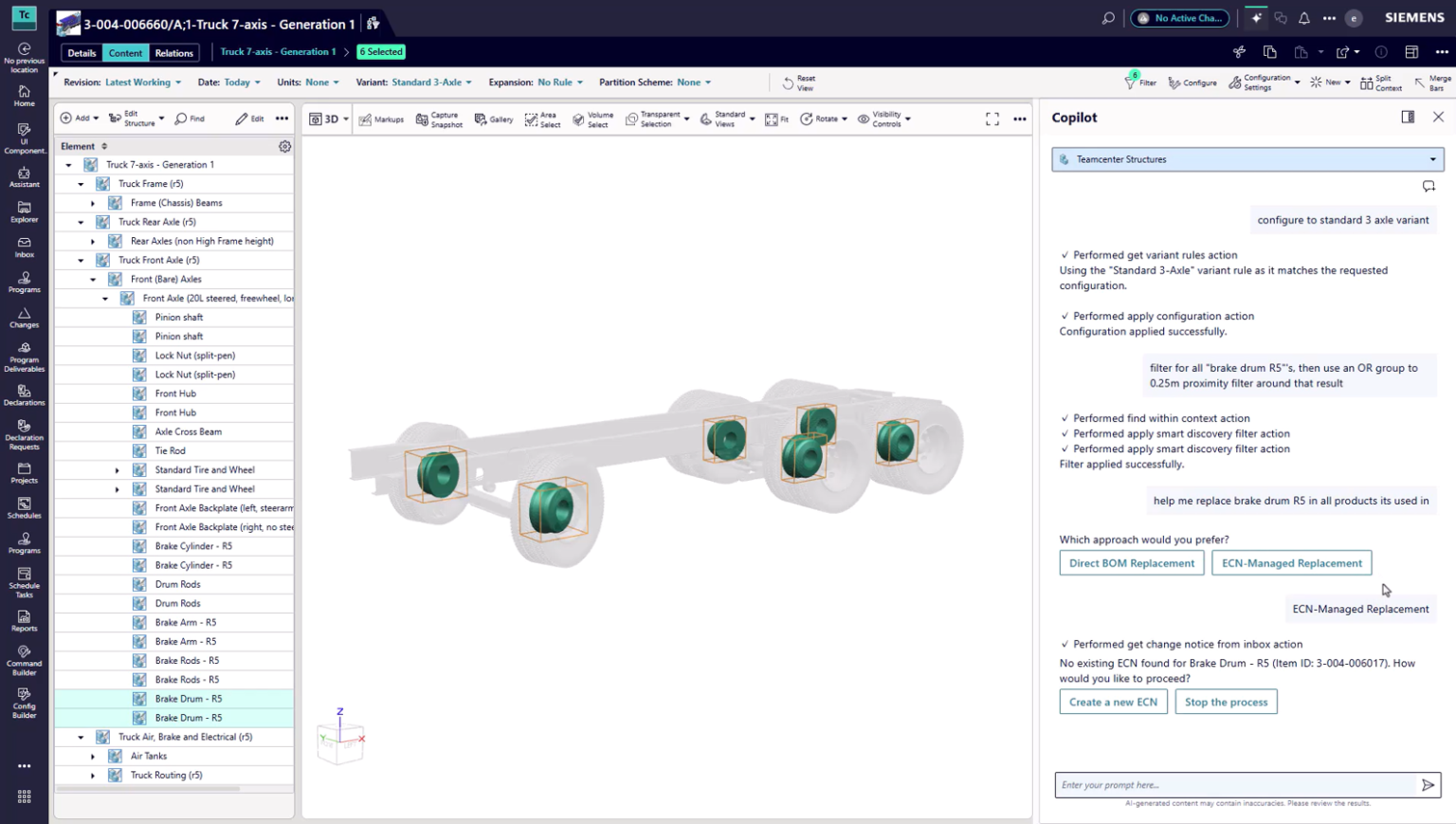
What to verify. Demonstrate a question about a specific released configuration and inspect the supporting records. Then test proposed BOM changes against a representative assembly, including the permissions and approval steps required. Confirm which capabilities are supported by your installed release and modules.
2. PTC Windchill AI
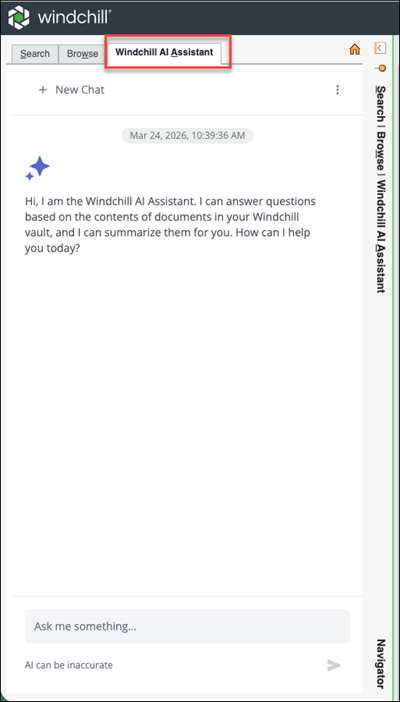
Windchill offers two notably different uses of AI. Its document assistant answers questions from indexed text and links back to source files, but PTC's documentation excludes native computer-aided design (CAD) geometry and images from searchable content. AI Parts Rationalization, released in January 2026, instead searches for similar part shapes to support consolidation.
That search has an important engineering limitation. PTC states that its similarity model ignores material and scale, so two bolts of different sizes can be treated as duplicates. Neither the material specification nor the part's intended application follows from a geometric match.
Parts rationalization can narrow a potentially enormous search, but engineers still need to establish whether the resulting candidates satisfy the relevant functional and manufacturing requirements.
What to verify. Test document retrieval and parts rationalization separately. For duplicate candidates, compare dimensions, material specifications, and intended applications before considering consolidation.
3. Aras InnovatorEdge AI
InnovatorEdge AI brings natural-language queries to structured records in Aras Innovator. Its documented capabilities include product structures, where-used relationships, revision histories, and change records, with links back to the source data. Aras also provides configurable agents capable of using external tools, giving customers more scope to shape the system around an established product-data model.
Once agents can modify product data, the permissions assigned to each action become consequential. The administrator guide describes controls over permitted actions, authentication, and human approval for data changes. An agent preparing a change should operate within the same governance constraints as the engineer who would otherwise perform that work.
InnovatorEdge also requires the Edge application programming interface (API) and an assistant package, while the AI service runs in the cloud even when Innovator is hosted on premises.
What to verify. Test queries and proposed actions against your custom data model, using the identity and privileges of an ordinary engineer. Confirm the required configuration and deployment arrangements.
4. Dassault Systèmes Virtual Companions
Dassault Systèmes has taken a broader approach with its 3DEXPERIENCE Virtual Companions. Announced as available in July 2026, AURA addresses program management, LEO complex engineering, and MARIE scientific work. Their competencies extend into design, simulation, and manufacturing.
For a team interested in simulation, the pertinent demonstration is the actual competency operating on its engineering inputs, with results that can be checked against established acceptance criteria. A claim that an AI system is grounded in scientific principles does not establish that its outputs satisfy a particular program's requirements.
What to verify. Confirm the competencies, roles, and deployment arrangements included in the proposed package. Ask Dassault Systèmes to demonstrate the relevant engineering task using representative inputs, including the resulting work and its validation.
5. Oracle Fusion Cloud PLM AI agents
Oracle's Component Replacement Assistant begins with a manufacturer's product change notification. It identifies the affected item, searches where that component is used, suggests replacements, examines downstream supply chain information, and prepares a change order for approval.
The workflow addresses a familiar problem in component obsolescence, where a substitution affects more than the assembly in which the obsolete part was first discovered.
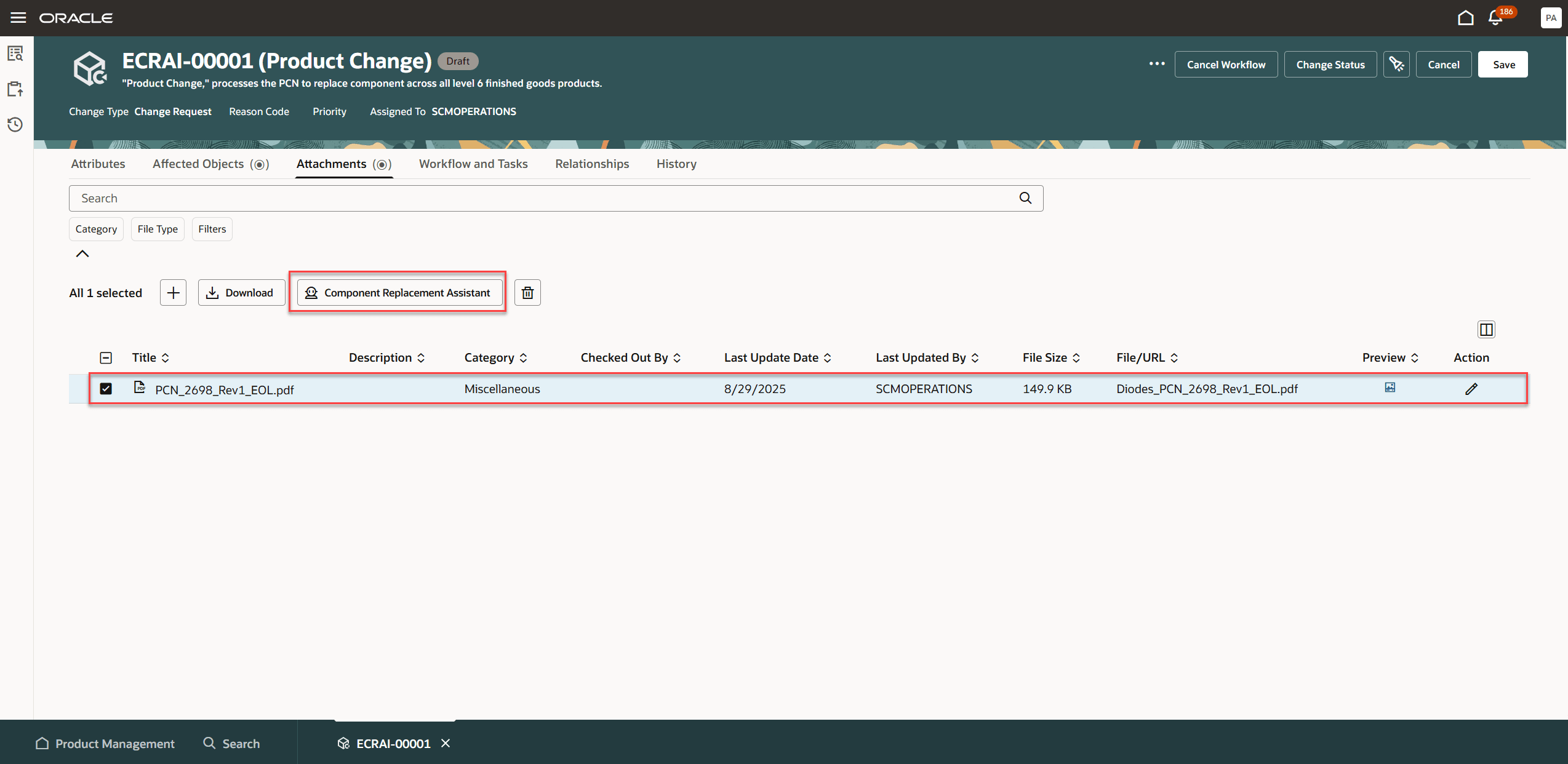
Oracle expanded the assistant in release 26A, adding manufacturer-part-number lookup and analysis of sales orders and planning information.
Buyers should establish the completeness of that analysis in their own release. The earlier 25D documentation limited where-used results to 25 records and excluded future-effective parent items, potentially leaving important dependencies outside the initial report.
What to verify. Run the workflow against a representative BOM and your company's approval matrix. Confirm the scope of the downstream impact analysis and whether the documented search limitations apply to your release.
AI search and engineering review across PLM systems
6. Sinequa by ChapsVision
A manufacturer may use one PLM system for controlled product structures, an enterprise resource planning (ERP) platform for purchasing information, and separate repositories for supplier documentation.
Sinequa addresses this divided information landscape through search across connected engineering and business systems. Its approach combines natural-language questions with structured identifiers such as part numbers and revisions, which engineers often know more reliably than a document's title.
Sinequa also describes applying the source systems' access permissions. This is particularly important when a search spans controlled product records, supplier documentation, and other repositories with different access rules.
What to verify. Test actual repositories with ordinary user permissions. Check how quickly revised documents and revoked access appear in the index, whether answers identify the relevant revision, and whether they link back to the authoritative record. Retrieving a CAD file is not equivalent to inspecting its geometry.
7. CoLab
CoLab integrates with multiple CAD and PLM systems, including Siemens Teamcenter, PTC Windchill, and Dassault Systèmes 3DEXPERIENCE, bringing engineering designs into a dedicated review environment. Here, engineers can evaluate designs against manufacturing requirements, collaborate on potential issues, and verify their resolution before release, while PLM continues to govern the official product record.
CoLab also supports engineering search through Operator, its AI interface for working with product data, engineering standards, and previous design reviews. Engineers can search and analyze information available in their CoLab workspaces, including engineering data brought in from connected systems, and use that information to investigate design questions or prepare review material. Operator remains in early access, and its current search scope should not be confused with unrestricted, live search across an entire PLM repository.
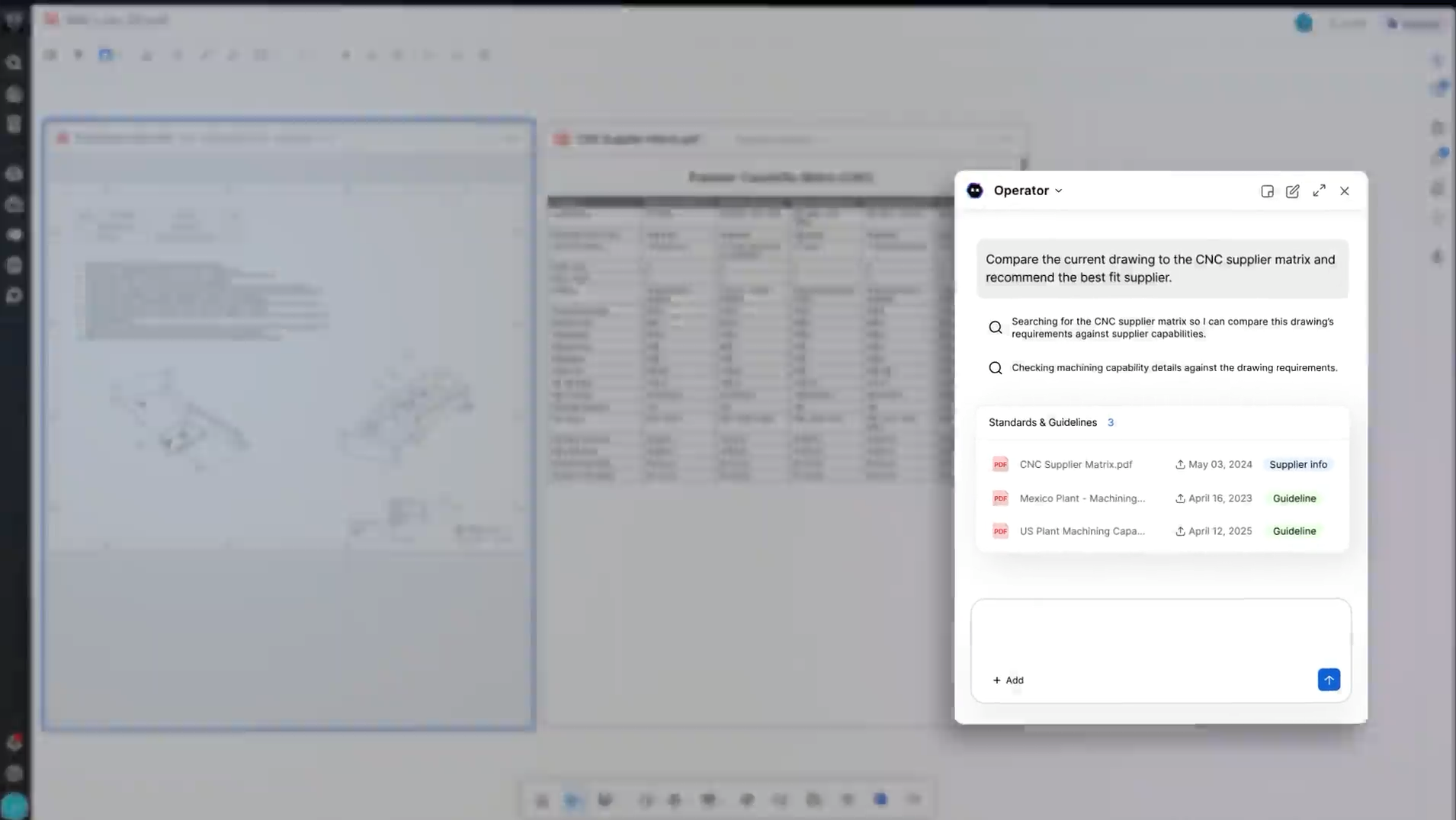
AutoReview brings AI into the review process through automated checks against engineering requirements and company-specific standards. Engineers can then discuss the recommendation, determine whether a change is warranted, and verify the resolution.
AutoReview also identifies conflicting material specifications, inconsistent tolerances between drawing sheets, and bill of materials (BOM) discrepancies. Beyond automated checks, CoLab's design review workflow captures feedback, engineering decisions, and issue resolution in relation to the design. This review history can inform subsequent projects, allowing engineers to draw on previously identified problems and lessons learned.
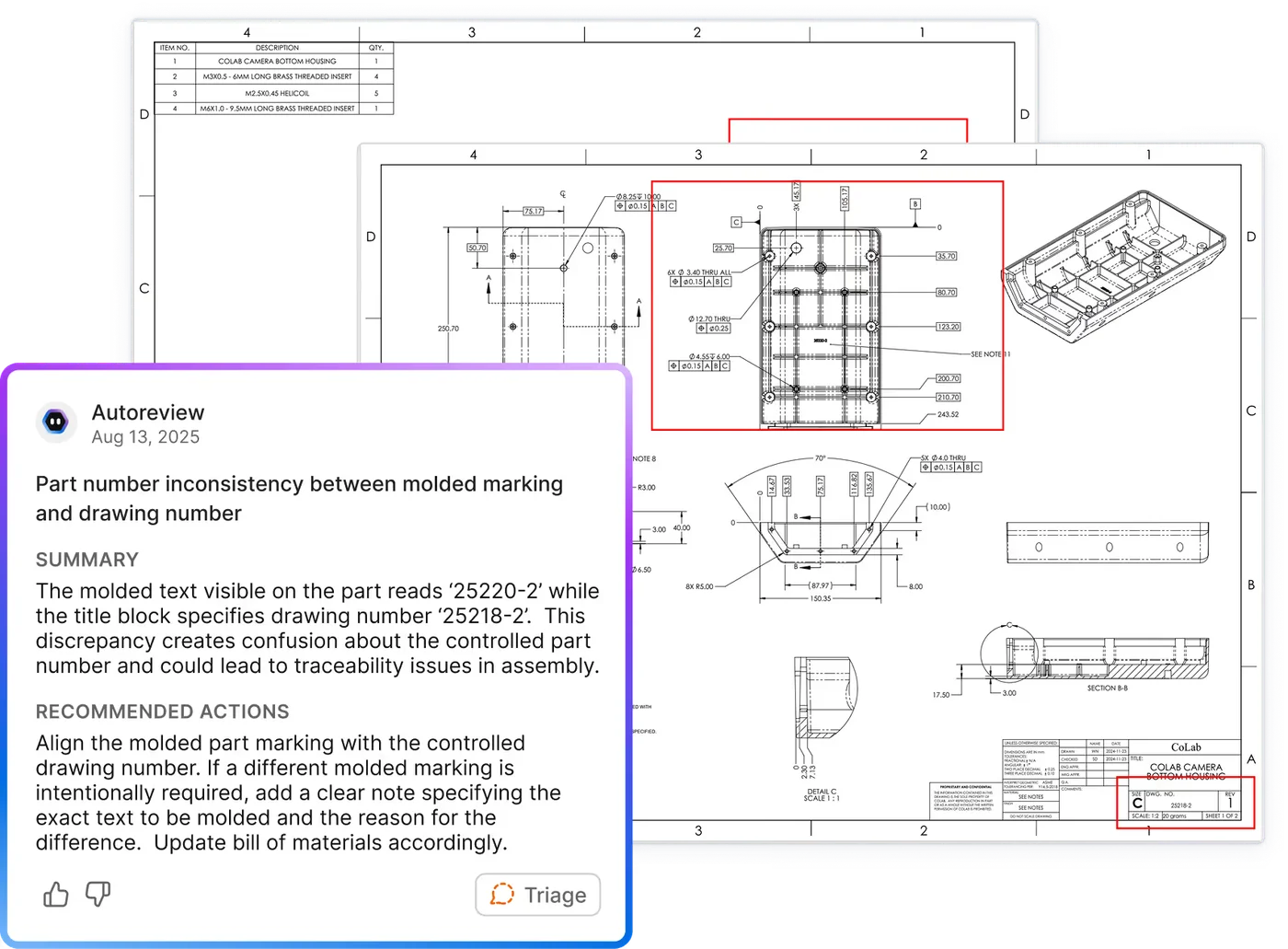
Through its CAD and PLM integrations, CoLab supports engineering reviews using files managed in existing systems, without requiring manufacturers to replace their PLM infrastructure or move formal release control into another platform.
What to verify. Test the integration with your PLM environment, including how design files and revisions enter CoLab and how updated designs are reviewed. Run AutoReview against a representative drawing and internal standard, then follow a finding through engineering review and resolution. Confirm which Operator and 3D checking capabilities are available for your deployment.
How to choose the right AI for your PLM workflow
Manufacturers have spent decades investing in PLM systems to manage product data, control revisions, and govern engineering changes. That infrastructure is a valuable foundation for AI, but its usefulness also depends on access to the engineering knowledge that informs those changes. Manufacturing guidelines, supplier capabilities, and lessons from previous design reviews may be stored in separate systems, if they're documented at all.
Consider an AI tool that identifies two geometrically similar parts. The result could help reduce duplicate inventory, but the engineer still needs to establish whether the material, dimensions, and functional requirements permit substitution. That assessment may require consulting internal standards or earlier engineering decisions. Similarly, an automated drawing check might identify an unusually tight tolerance, but determining whether to change it requires an understanding of manufacturing capability and the design's intended function.
When evaluating AI for PLM, pay particular attention to the engineering information a tool can access and how it uses that information. Can it apply your company's own standards rather than generic rules? Can it surface relevant findings from previous reviews? If engineers accept a recommendation, can they assign the resulting work, review the change, and verify that the concern has been resolved?
These capabilities are especially relevant to manufacturers operating across multiple CAD and PLM environments. An AI tool confined to one PLM instance may be useful for managing its product records, while an independent platform with integrations across several systems can support more consistent engineering review practices across programs and business units. The integration itself still needs scrutiny, particularly how files, revisions, and permissions are handled.
A useful pilot should therefore follow an actual engineering issue from identification through resolution. Test the software against your own designs and standards, examine the supporting information behind its recommendations, and establish how engineers act on the results. The most valuable outcome is an engineering review process that can apply more of your organization's accumulated expertise to new designs while preserving PLM's role in controlling the official product record.
Put AI to work before the next design release
CoLab brings AI-powered design checks, engineering knowledge, and collaborative review into your existing CAD and PLM workflows. Engineers can identify potential issues, evaluate recommendations against company standards, and work through their resolution before release.
Book a CoLab demo to see AutoReview in action on a real engineering design and explore how CoLab works with your existing PLM environment.



About the author
Adam Taaffe is a Digital Marketing Manager and AI enthusiast at CoLab Software.

