Talk to a product expert
CoLab 4.0: A Deep Dive
CoLab 4.0 is the culmination of hundreds of features, including 15 new and updated capabilities across 5 product areas.



Three New Collaboration Surfaces
Most engineering work happens outside of structured reviews: brainstorming as a team, discussing tradeoffs, or walking someone through something on screen.
CoLab 4.0 adds three surfaces to make this unstructured collaborative work more productive.
Canvases
Many engineering teams still use physical whiteboards or standalone digital whiteboarding tools for brainstorming. The downside is that the ideas and decisions that come from the brainstorm remain disconnected from the actual design files they relate to. That makes it harder to preserve the context behind a decision or bring that context into a design review.
Canvases are virtual whiteboards built into CoLab. A canvas is created as an asset in the Drive menu, and can be used in split view alongside a design file or other asset. Multiple people can work on the same canvas at once, in real time. The visual work stays in CoLab, connected to the workspace, with no export step.
Early access teams are applying canvases across a range of engineering work, including but not limited to:
- Root cause analysis: Build out a cause-and-effect diagram together, tracing a problem back through its contributing factors to find what's driving it.
- Concept brainstorming: Sketch and compare rough concepts at the start of a project, before any one direction is committed to.
- Failure mode mapping: Lay out how a design or process could fail, and where, before formalizing it into an FMEA.
- Value engineering: Work through where cost can come out of a design without giving up function, capturing ideas as the discussion develops.
- Test planning: Map out what needs to be tested and how, before the test plan is formalized.
Once you've created a canvas, you can use Operator, CoLab's AI interface, to populate and edit its content from a prompt instead of placing every element by hand (more on Operator below).
Coming next: Create traceable feedback on a canvas, drag-and-drop of native CAD files directly onto the board, and version tracking.
Notebooks
The written context around a design often gets scattered across different places. Design intent, open questions, meeting minutes, and decision rationale often end up in a SharePoint folder or lost completely.
Notebooks give teams a place to capture that written context inside CoLab. They are collaborative, document-style assets that can hold notes, images, decisions, links, and supporting details related to a design.
Unlike a static PDF or Word document, Notebooks are living documents that can be edited and maintained by multiple users over time.
And like Canvases, Notebooks are compatible with Operator, CoLab's AI interface. You can create, populate and edit Notebooks directly from a conversation with Operator (more on Operator below).
Teams are already using notebooks for organizing RFQ documentation, building central project reference documents, tracking milestones across programs, capturing meeting notes and pre-reads, and documenting instructions for suppliers.
Coming next: Export Notebooks to PDF, Feedback inside Notebooks, and full-text search across Notebook body content.
Video Review
Some forms of engineering context aren't captured in a CAD model or a drawing: how a mechanism moves, how a part behaves during testing, what's happening on the manufacturing floor, or simulation results. And often the person who needs to see it wasn't in the room when it was shown.
CoLab now supports video as a reviewable file format. Upload an .mp4 file, play it inline, and leave feedback tied to specific moments in the playback. Recording happens outside CoLab; CoLab handles playback and review.
- Upload and playback: Upload .mp4 or .webm files and play them inline, with play, pause, speed, and fullscreen controls.
- Timestamped feedback: Leave feedback on a video tied to the moment it was created, shown as a pin along the playback timeline.
- Feedback export: Video feedback timestamps are included in the feedback PDF export.
- Download: Download the original video file.
AI Review Tools
A new AI interface for searching, analyzing, and acting across your engineering work, and AutoReview 2.0, a major update to CoLab's automated design checks.
Operator (Early Access)
.png)
Operator is the conversational AI interface in CoLab.
Where AutoReview was built to perform structured design checks using purpose-built agents, Operator is user-driven and meant to handle a broader scope of engineering tasks.
Operator works from a variety of data sources in CoLab, including feedback, reviews, and standards and guidelines documents, other project documents, and can generate Notebooks and content within Canvases.
You can think of Operator as four capabilities in one interface:
- Search: Ask any question and Operator returns a single cited response, reading across every file, review, feedback item, standard, and guideline in CoLab, plus the web.
- Analyze: Ask Operator to analyze a drawing and assess tradeoffs. On 2D drawings it reads attributes like tolerances, materials, and surface finishes, then pairs them with your project context to make specific recommendations. Geometric analysis of 3D parts, including wall thickness and draft angle, is coming soon.
- Generate: Operator can generate Notebooks, and create charts, tables, and diagrams, directly on Canvases.
- Soon, Automate: Operator will be able to execute multi-step tasks: create reviews, act on feedback, and run workflows in connected tools.
*Operator is currently in Early Access. Please reach out if you’re interested in participating.
AutoReview 2.0
.png)
AutoReview 2.0 improves on the first generation in speed and accuracy, surfacing more relevant issues for reviewers to act on.
- More accurate 2D reading: Improved recognition of engineering symbols and more reliable reading of drawing tables.
- Faster results: Issues surface as the analysis runs, with the first results appearing faster.
- Broader check coverage: First-generation AutoReview focused on dimensions, materials, and typos. AutoReview 2.0 adds specialized coverage for areas like tolerancing, geometric callouts, fastener and thread specifications, and BOM consistency.
- Uses your standards and checklists: AutoReview runs leverage and reference your own uploaded standards, guidelines, and checklists, for more relevant and specific findings.
- 3D manufacturability (early access): Runs manufacturability checks on 3D parts for processes including machining, sheet metal, and injection molding.
CAD Integrations & Enterprise Tools
New integrations with Creo and NX, and expanded enterprise API endpoints.
CoLab Integration for Creo
Engineers working in PTC Creo previously didn’t have a way to send files directly to CoLab without relying on manual downloading and uploading.
The CoLab plugin for Creo solves this problem. Sign in to CoLab from inside Creo and upload the active model to any workspace you have access to, without leaving the CAD session. It fits at the start of the review process, getting a Creo model into CoLab in one action.
- Upload from the ribbon: Sign in within Creo and upload the active model to a chosen CoLab workspace.
- File formats: Part files (.prt), assemblies (.asm) including their component parts, drawings (.drw) converted to PDF on upload, and Family Table parts and assemblies.
- Windchill metadata: For files checked out from a Windchill PDMLink or ProjectLink workspace, the correct revision and iteration metadata is preserved on upload.
The integration is compatible with Creo 8.0.1 and above; admin installation required.
CoLab Integration for NX
Similarly, teams using Siemens NX couldn't easily share CAD files into CoLab without manual downloading and uploading.
The CoLab plugin for NX adds a CoLab command to the NX ribbon, letting an engineer upload the open design to a CoLab workspace without exporting or leaving NX.
- Upload from the ribbon: Sign in within NX and upload the active design to a chosen CoLab workspace.
- File handling: NX uses .prt for parts, assemblies, and drawings. Parts upload as-is; assemblies traverse the full assembly tree and stage all referenced components automatically; drawings convert to PDF. Part Families are supported.
- Teamcenter metadata: For teams running NX with Teamcenter, managed part numbers and revision IDs are read from the open file and preserved on upload.
Expanded Enterprise API
CoLab launched the Enterprise API in early 2026 so enterprise teams could manage CoLab in bulk and pull review and feedback data into their own systems, rather than doing everything by hand in the UI. The first release covered bulk management of workspaces, users, folders, files, portals, and reviews, plus audit log access.
The improvements extend that surface from mostly managing structure and reading data to managing the review content itself. It fits where CoLab connects to a customer's broader toolchain: provisioning, reporting, and syncing data between systems.
- Feedback and comments: New endpoints let you create, read, update, and delete feedback and the comments on it, so feedback can move between CoLab and external systems rather than only being read out.
- Review keys in the API: Each review now carries a unique Review Key, exposed as a field on the review object, so a specific review can be referenced or pulled into external reporting without ambiguity.
- Coming next, user-scoped authentication: Beyond today's all-access API key, user-scoped access is on the way, for tighter control over what an integration can reach.
Customers are already using the API to build automated review and change flows, and to pull CoLab data into their own systems for deeper analysis.
Company Switcher
.png)
Users with access to more than one CoLab environment can switch between them without signing out and back in. This covers people who work across separate organizations as well as those whose company runs CoLab separately across divisions. To switch, click the CoLab logo in the navigation and choose the environment you want to switch to.
The company switcher won't show up by default, but is available upon request. Please reach out to us to get access.
Navigation & Desktop
A redesigned navigation with a persistent global sidebar, a native desktop app, and dark mode.
New Navigation
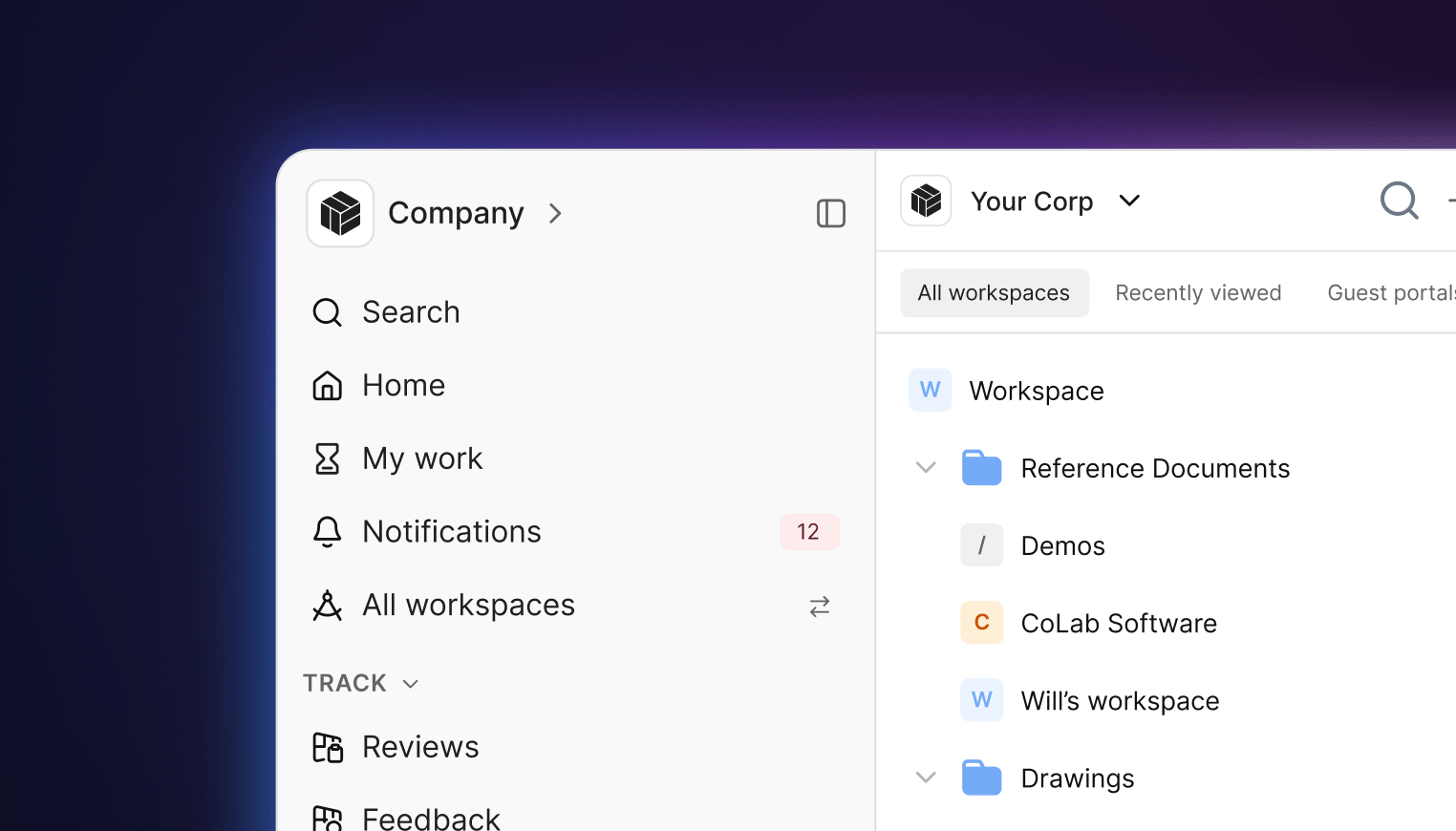
CoLab's navigation now has a consistent structure that stays the same wherever you are in the product. The global options stay fixed in place, each workspace and portal uses the same layout, and the result is a more intuitive way to move between company, workspace, portal, and file.
- Persistent global sidebar: Search, Home, My Work, Drive, Notifications, and the workspace switcher stay in a fixed place rather than moving by context.
- Collapsible sections: Favourites, recently viewed, and track sections can be collapsed and reordered; the nav can be pinned open, hidden, or opened on hover when collapsed.
- Consistent workspace navigation: A secondary nav bar (Drive, Portals, Reviews, Feedback, Settings) stays consistent within any workspace or portal.
- Breadcrumb switching: Breadcrumbs run from company to workspace to portal to file to revision, with workspace and portal switching available directly from them.
Desktop App
%20(1).png)
CoLab now runs as a native desktop application, not only in a browser tab. For engineers who are in CoLab throughout the day, it provides a dedicated location that sits alongside their other engineering tools instead of competing with browser tabs.
Dark Mode
.png)
A dark color theme for the interface, for users working long sessions or in low-light environments.
Viewing & Feedback
A faster way to comment on 2D files, a measure tool that detects what you're measuring instead of making you pick a tool, and section planes redesigned for managing multiple cuts at once.
2D Pins
.png)
2D Pins let reviewers drop a feedback pin directly on any location on a 2D file or drawing and start writing, no markup required.
- Drop a pin anywhere: Place a feedback pin on the drawing and type the comment, with the usual feedback details: type, assignee, and text-to-speech.
- Reposition before submitting: Move a pin before submitting the feedback, to place it exactly where it belongs.
- Progressive detail: A pin shows its location when static, a compact preview on hover, and the full feedback card on click.
Advanced 3D Measuring
The Measure tool no longer requires the user to manually select a measurement option as a first step. Simply select multiple points on the geometry, and the Measure tool will give you the correct measurement.
Select a single edge and you get its length; select a circular face and you get radius and diameter; select two faces and you get the distance between them, defaulting to the shortest. When a selection supports more than one measurement, CoLab shows the most common one and offers the rest in a dropdown.
- Select and measure, no setup: Hover and click geometry; the tool detects what you selected and returns the right measurement, instead of picking a measurement type up front and retrying when it doesn't fit.
- New measurement types: Min and max distance between irregular edges, and distance to or from a circle.
- Switch types without reselecting: When a selection supports more than one measurement, pick between them from a dropdown on the measurement itself.
- Point-to-point and angles: Hold Shift and click to place points for point-to-point distance and angle measurements.
Improved Sectioning Capability
.png)
Section planes got three improvements. The controls now live in a floating panel, you can define a cut from any model face, and a plane's state saves with the feedback you leave, so a reviewer opens to the same cross-section you were looking at.
- Section panel: Clicking the section planes icon opens a floating panel with show, hide, reverse, and lock controls for all active planes; planes are color-coded by axis.
- Custom Face Plane: Alongside the standard X, Y, and Z planes, define a custom cutting plane by selecting a face on the model.
- Precise offset: Set an exact offset for a plane's position with a numeric input, rather than placing it by eye.
More on 4.0 and other recent updates
This covers what shipped in 4.0 and where each capability fits into design review. For the full list of releases, including other updates not covered here, and for new features as they ship, see the CoLab product updates page.
Want to see CoLab in action?