

Talk to a product expert
Trust but Verify: A Mechanical Engineer’s Guide to Validating AI-Generated Designs


Everyone has seen the demos: a prompt goes in, and a complex, organic-looking bracket comes out. It looks impressive. It looks optimized. But as an engineering manager, you know that looking optimized and being manufacturable are two very different things.
Generative AI and Text-to-CAD tools are shifting the fundamental role of the design engineer. Your team is moving from being the authors of geometry to the auditors of geometry.
The problem is this: today’s AI models are probabilistic, not deterministic. They can and do "hallucinate" geometry: creating shapes that are mathematically plausible but physically impossible or catastrophically weak.
So, here is a validation framework you can use to safely validate AI-generated designs before anything hits production or prototyping.
Step 1: Verify the Geometry (Topology & Morphology)
Before you even think about simulation, you need to validate the topology. AI models trained on visual datasets often prioritize surface aesthetics over volumetric integrity.
The Geometric Audit:
- Manifold Integrity: Don't just check for holes. Look for "T-junctions" (edges shared by 3+ faces) and "bowtie singularities" (volumes connecting at a single vertex). These non-manifold artifacts will confuse slicing engines and crash CAM software.
- Interference Detection: If the AI generated an assembly, check for self-intersections. Generative algorithms rarely understand tolerance stacks or kinematic clearance unless explicitly constrained.
The DFM Audit: AI doesn't inherently know if you are machining, casting, or printing a part. It just knows shape.
- Draft Angles: AI lacks "pull direction" awareness. It often generates vertical walls (0° draft) that lock parts inside the mold. Flag any face with less than 0.5° draft immediately.
- Tool Reachability (L/D Ratios): Generative design loves creating deep, organic voids to save weight. Check the Length-to-Diameter (L/D) ratio of these pockets. If a feature requires a tool ratio greater than 5:1, you will get excessive chatter and poor surface finish.
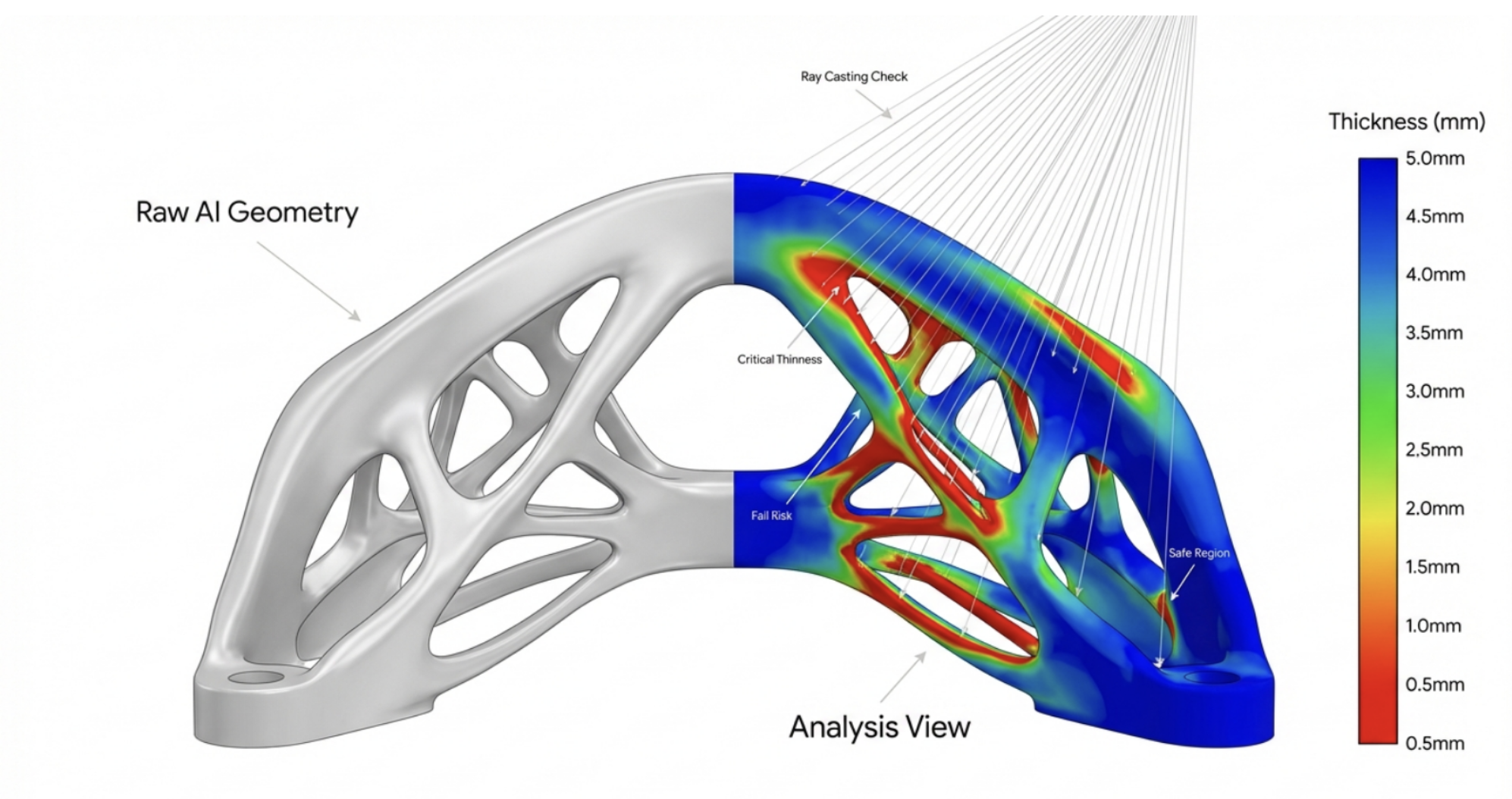
- Wall Thickness: Use ray-casting analysis to find "zero-thickness" membranes. AI often generates surfaces that visually close a volume but are thinner than your printer's melt pool or nozzle width.
Step 2: Physics is the Ultimate Truth (FEA & Simulation)
This is the most critical step. There is a high volume of search traffic for "AI simulation," but the reality is that AI is not a simulation tool. You cannot rely on the "confidence score" of a generative model. You must validate it with physics.
The Validation Workflow:
- Bridge the "Simulation Gap": AI meshes are often full of high-aspect-ratio "slivers" that cause numerical instability. You must repair and remesh these surfaces before trusting any FEA result.
- Run "Robustness Load Cases": Generative algorithms are notoriously literal. If you optimize for a vertical load, the AI may remove all material resisting torsion. Apply off-axis loads (e.g., 10% lateral force) to ensure the structure doesn't buckle under slight eccentricities.
- Stress Concentrations: Look for shear stress at the interface between lattice cores and solid skins. AI often fails to radius these transitions properly, creating nightmare stress risers.
- Modal Analysis: Don't forget vibration. An AI-optimized bracket might save 20% mass but shift its natural frequency to align with your motor’s operating speed. Ensure a separation factor of at least 2x.
Step 3: Material & Compliance Context
AI tools often treat material as an abstract variable. They might generate a spindly structure that is safe in Titanium but will fail instantly in Aluminum.
The Compliance Checklist:
- Safety Factors: Does the design meet the specific Factor of Safety (FoS) required by standards like ASME Y14.46? The AI was likely not trained on your specific compliance code, so it defaults to a limit state (FoS = 1.0).
- The "Knock-Down" Factor: AI assumes a perfect continuum surface. In the real world, additive manufacturing leaves a rough surface that acts as a field of micro-cracks. You must apply a Surface Roughness Knock-Down Factor to your fatigue life calculations, or your simulation is invalid.
Step 4: The Human-in-the-Loop Review
Even after a design passes geometric and physics checks, generative systems can still produce non-intuitive solutions or overlook practical considerations such as tolerances, assembly constraints, or serviceability. Research on generative design consistently stresses that engineers must validate outputs to ensure parts can be manufactured with the intended processes.
Formalize the review and sign-off You need to establish a clear system of record for every AI-generated model considered for production. Do not rely on ad-hoc email chains or chat screenshots.
- Stage the review: Move the validated model into a structured design review platform (like, CoLab) where geometry, simulation results, and specifications can be viewed together.
- Cross-functional interrogation: AI rarely understands the downstream supply chain. Bring in senior mechanical engineers along with manufacturing, quality, and supply-chain stakeholders. Ask the hard questions: Does the design meet all regulatory requirements? Can it be assembled, inspected, and serviced? Does it introduce unanticipated supply chain risks?
- Document the rationale: For every approval or rejection, record why. If a lattice is too fine for powder removal or a bracket’s natural frequency coincides with a motor’s operating speed, note it explicitly. If you use a dedicated design review system, like CoLab, it will handle the documentation and traceability for you.
- Close the loop with feedback: Treating human review as a disciplined, auditable process allows you to turn "failures" into assets. Over time, feed these documented outcomes back into your AI workflow. Again, a dedicated system builds the review process as you complete it. The more you use the tool for reviews, the more structured the process becomes.
Accumulated design intent notes and failure reasons help train junior engineers and—if you’re using a bespoke model—can be used to adjust the system’s parameters (RLHF). By capturing this context, you build a knowledge base that prevents repeat mistakes and ensures that AI serves as a powerful assistant without eroding engineering accountability.
AI is a powerful suggestion engine, but it is not a CAD approval tool. The final approval still belongs to the Professional Engineer.
While AI-generated CAD is an almost assured reality, the organizations who win will be the ones that build the most robust validation pipelines. Meaning, they’ll catch the hallucinations before they hit the shop floor. Trust the potential of the tool, but verify every single polygon it gives you.
If you’d like to chat about building a reliable AI validation workflow, schedule a consultation with us here.



About the author
Adam Taaffe is a Digital Marketing Manager and AI enthusiast at CoLab Software.

