

Talk to a product expert
How to Use AI for Manufacturing Drawing Reviews: A Step-by-Step Guide


Two important stats will come out of the 2026 AI in Engineering survey report:
- 90% of engineering leaders believe AI will outperform a human checker in all drawing reviews over the next 18 months.
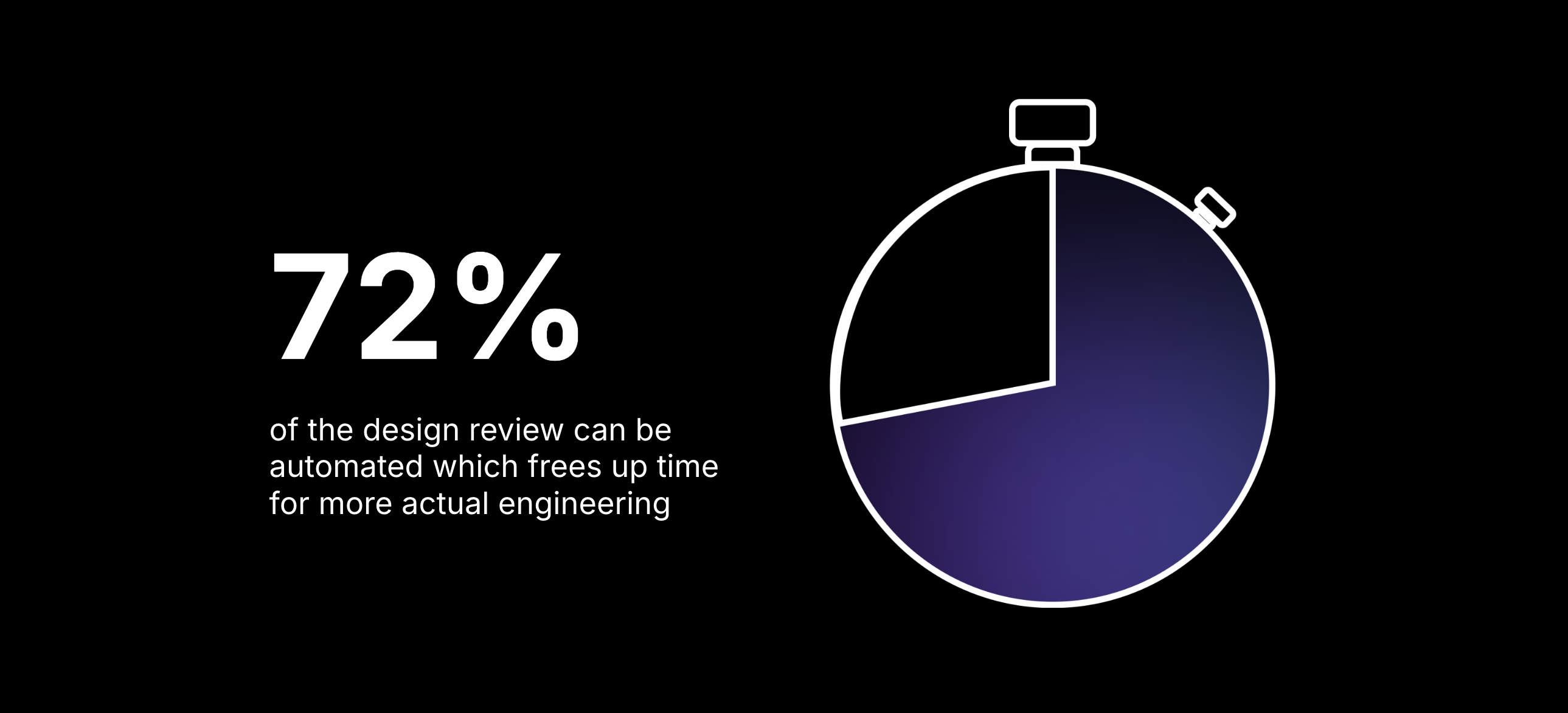
- Engineering leaders believe 72% of drawing reviews could be automated with a trained AI.
Despite the momentum around AI, there’s still a gap in how engineering teams apply it in practice—especially for manufacturing drawing checks.
Many engineers are already experimenting with AI in isolated ways, often through one-off prompts or individual tools. But without a shared workflow, these efforts are inconsistent, hard to scale, and don’t improve the process over time.
When teams do use AI today:
- The process isn’t reliable, often requiring as much manual cleanup as the original workflow.
- The effort isn’t scalable, because AI lives in isolated interactions and doesn’t feed a shared system of record or reusable knowledge.
Engineering teams can overcome these limitations by choosing workflows where AI and human engineers each have clear roles—and where AI output becomes part of the review process, not a side experiment.
One such workflow is: manufacturing drawing checks.
Makes sense, right? The process is repetitive, requires a lot of data (think standards and guidelines) and is admin-intensive.
This guide shows engineers how and when to use AI during a manufacturing drawing check. Plus, it’s based on real-world experience from hundreds of engineers.
This guide will break down:
- Why AI for manufacturing drawing checks is the right workflow
- The right and wrong use cases for AI drawing reviews
- A step-by-step workflow to conduct an AI manufacturing drawing review
- The tools available now that can meaningfully improve drawing review quality
Why AI for Manufacturing Drawing Checks Matters Right Now
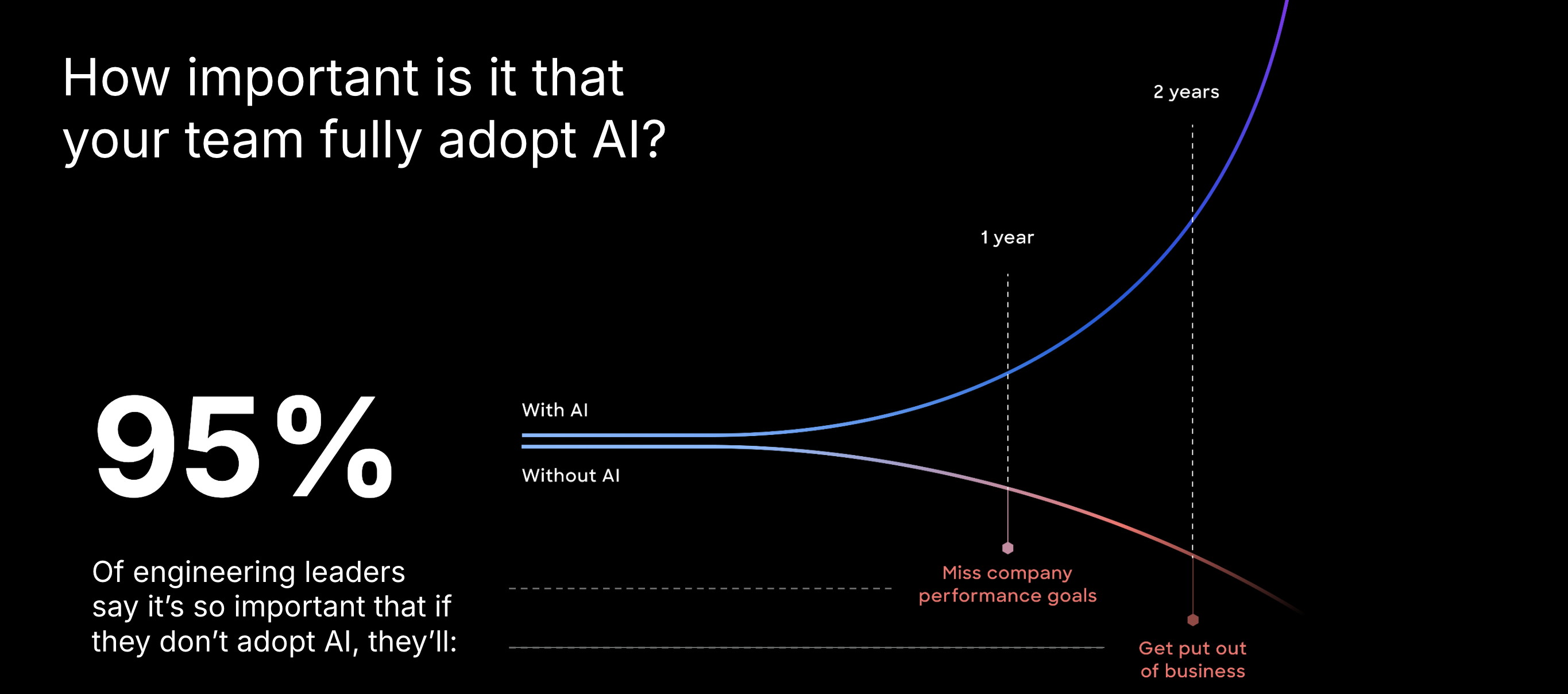
Engineering leaders overwhelmingly agree that AI will transform hardware development in the next two years. In the same survey referenced earlier, engineering leaders predict that teams without an AI strategy will fall behind their competitors who have faster, more effective processes. Some in as little as 12-18 months.
When it comes to how to build faster, more effective processes, the key is to start with the right workflow. The ideal workflow for AI is one that’s repetitive, admin-intensive and integrates with other systems and people. For engineering teams, drawing reviews is one of the most obvious tasks that fit this bill.
The ideal workflow for AI is one that’s repetitive, admin-intensive and integrates with other systems and people.
The problems with manufacturing drawing reviews today
Across the companies CoLab works with, several universal pain points appear in drawing review workflows:
- Institutional knowledge isn’t documented or searchable.
Lessons learned live in inboxes, slide decks, or senior engineers’ memories, making it hard for new engineers to avoid repeat mistakes. - Standards and guidelines are too robust to manually apply.
Many teams have 200+ pages of ASME and internal standards, but no time to cross-check every dimension, datum, or note. - Drawing reviews are slow, sequential, and error-prone.
Drawings still get printed out, redlined and passed along from engineer to manufacturer back to the engineer. Reviewers take turns, leave contradictory comments, or miss issues entirely. - Cost of poor quality (COPQ) is high and traced back to drawing reviews.
Small errors—missing tolerances, ambiguous notes, incorrect callouts—ripple into scrap, rework, and delays. One company misspelled a supplier name and procurement sent for an entire order of incorrect parts.
AI won’t replace engineering judgment. But AI does eliminate the tedious, repetitive, and error-prone parts of drawing checks. So human engineers can focus on more high-impact decisions. But, let’s see where AI comes in and where human engineering judgement is still required.
The Right and Wrong Use Cases for AI in Manufacturing Drawing Checks
AI for manufacturing drawing checks is powerful, but it also has clear boundaries. Knowing those boundaries upfront ensures teams apply AI responsibly and effectively.
✅ What AI Is Good at Today
Based on AutoReview capabilities and customer usage data, here are the strongest proven use cases:
1. AI can detect drawing quality issues quickly and consistently
AI can identify:
- Missing tolerances
- Invalid or ambiguous GD&T
- Spelling mistakes
- Title block inconsistencies
- Undefined or TBD callouts
- Incorrect or missing material specifications
- Missing quantities for repeated features
- Standards violations (ASME Y14.x + internal)
This is critical for human reviewers because these are really the mistakes that shouldn’t make it to a drawing at all. This frustrates human engineers and distracts them from more complex and impactful decisions.
.avif)
2. AI can apply internal design standards & guidelines automatically
There are tools today, like CoLab’s AutoReview, that ingest standards, guidelines, NCRs, and past reviews. And then apply and cite the relevant guidelines when flagging an issue.
For example, in one drawing, the material callout for a plastic camera housing didn’t meet the customer’s environmental-exposure guideline. AutoReview flagged it and recommended a UV-stabilized alternative based on the internal design standard.
3. AI can accelerate parallel reviews with cross-functional teams, customers or suppliers
So, we know AI can catch the basic errors and apply design standards and guidelines to the drawing. This means, AI can also prepare a cleaner first-pass drawing, so tooling, suppliers or customers can focus on deep engineering decisions, not get distracted by basic drawing errors.
4. AI can capture and apply design knowledge automatically
Each AI-generated annotation becomes a structured feedback item—tagged, searchable, and linked to the drawing. This creates AI-ready institutional knowledge automatically.
❌ What AI Is Not Good at Today (and Should Not Replace)
1. AI cannot infer design intent without clear context
AI cannot yet fully interpret functional intent behind a dimensioning scheme. This should still be left to human engineers.
2. AI cannot make tradeoffs or exceptions
Design decisions often involve:
- Cost vs. tolerance
- Manufacturability vs. performance
- Supplier capability vs. ideal spec
Those require human engineering judgment—not AI. While AI can offer suggestions based on best practices and program requirements, it should not be the final arbiter.
.png)
3. AI cannot fully assess complex assembly-level tolerance stacks
AI can identify geometric risks, but full multi-part functional stacks require human oversight. Some AI tools, like CoLab’s AutoReview, are laying the foundation, but not fully there yet.
4. AI cannot decide final release readiness
AI surfaces risks and cites guidelines, but humans must own the final decision to approve drawings for release.
How to Use AI for Manufacturing Drawing Reviews: A Step-By-Step Workflow
This workflow comes directly from real CoLab customer processes using a combination of AI tools, engineering software and human judgement.
Step 1: Upload or Sync Drawings into Your Review Environment
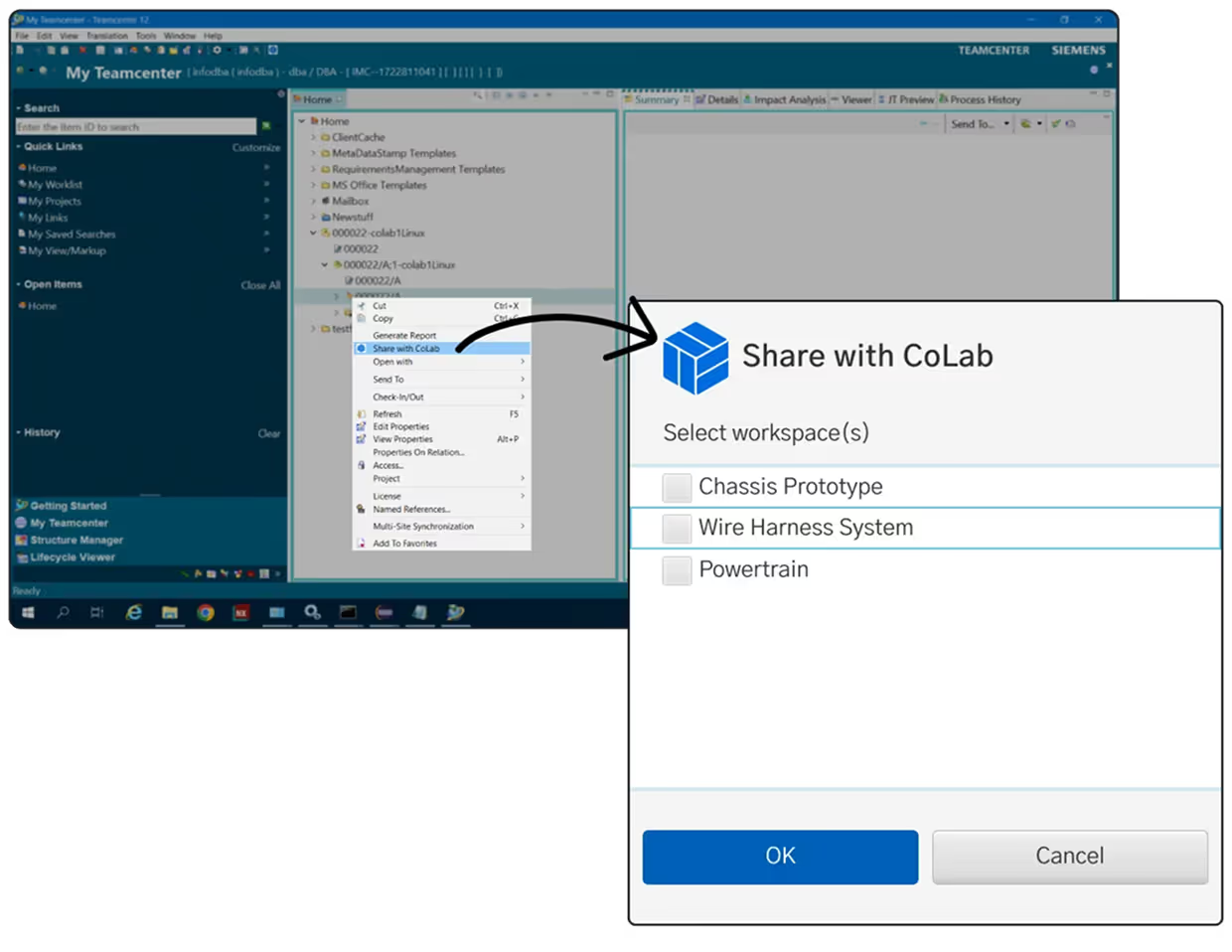
Engineers push designs from PLM (Windchill, Teamcenter, 3DX, SOLIDWORKS PDM) into CoLab. The drawing then becomes a controlled point-in-time version.
Why it matters:
No more “reviewing the wrong version” or chasing down pack-and-go files in email or SharePoint.
Step 2: Run AutoReview (AI Peer Checker Agent)
AutoReview scans the drawing and flags:
- Missing dimensions
- Invalid datums
- Ambiguous notes
- GD&T issues
- Material inconsistencies
- Title block errors
- Standards violations
Every finding includes a location pin with markup, the reason behind the suggestion, and a recommended fix.

Step 3: Triage the AI Feedback
Each finding becomes a structured issue that the engineer can accept, reject, or modify.
You can:
- Assign to a teammate
- Add markup
- Adjust criticality
- Provide reinforcement (thumbs up/down) for future refinement
Human judgment required:
Rejecting false positives
Prioritizing which issues to address
Interpreting functional intent
.avif)
Step 4: Bring in Cross-Functional Reviewers
With clean AI-assisted drawings, invite:
- Manufacturing
- Quality
- Sourcing
- Suppliers
- Program managers
- Customers
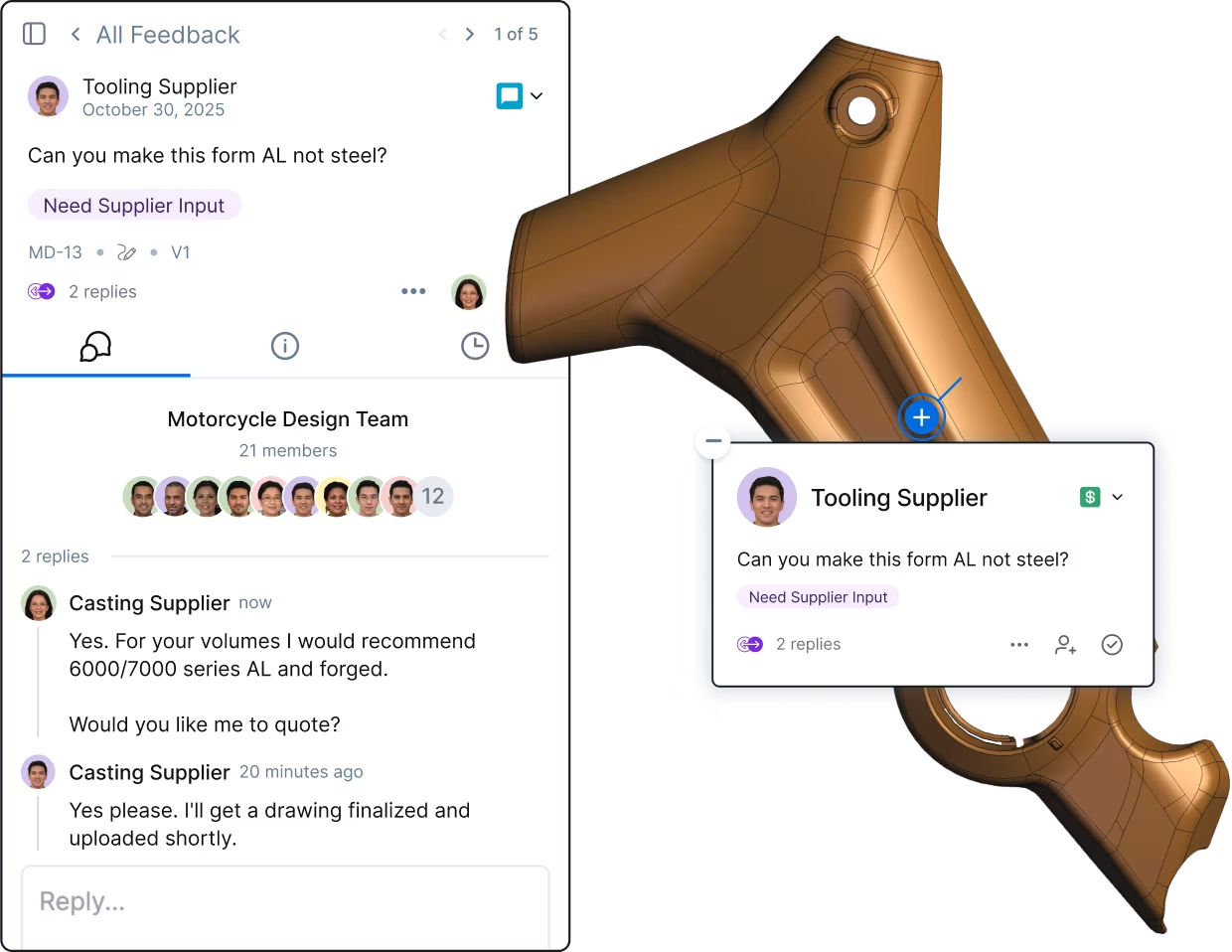
CoLab lets each reviewer open the drawing in a browser—no CAD or PLM license required—and add contextual comments. With the errors and mistakes removed, you can have more robust conversations on tradeoffs, design intent and requirements with the people who matter most.
Step 5: Compare Versions and Validate Changes
As you begin making changes and preparing the drawing for release, CoLab overlays drawing revisions and highlights changes. This way engineers can clearly see the modifications from revision-to-revision.
Reviewers see:
- Old vs. new geometry
- The comment that triggered the change
- Whether the fix resolved the issue
This ensures nothing slips through before release.
Step 6: Track every issue through to resolution
Because every AI or human comment becomes:
- An issue
- With an owner
- With a status
- With full traceability
This eliminates external spreadsheets and ensures every drawing change is captured and resolved. Engineering teams can release final production drawings with more confidence that any risk has been mitigated to the best of their ability.
Tools for AI-Driven Manufacturing Drawing Checks
Here are the tools currently helping engineering teams modernize manufacturing drawing review workflows. This list is not exhaustive nor does it cover the use cases and recommendations specific to industry.
If you’re looking for a more comprehensive guide to AI tools for manufacturing drawings, here’s that list.
AI Agents for Manufacturing Drawing Review
What they do
AI agents that read 2D drawings “like an engineer”: checking for missing or inconsistent details, DFM issues, cross-sheet mismatches, and internal standards. This works inside a collaborative review environment where AI and human feedback is created, categorized, tracked and fed into an evolving knowledge model specific to your company.
Examples
- CoLab AutoReview (AI Peer Checker Agent)
CAD-Native Standards Checkers (Rules-based)
What they do
Rule-based checks inside the CAD system: dimensions, fonts, layers, title blocks, views, standards compliance, basic modeling best practices.
Examples:
Inspection & Ballooning / FAI Tools
What they do
Automatically balloon drawings, extract dimensions/GD&T via OCR/PMI, and generate inspection plans and reports (AS9102, PPAP, in-process inspection).
Examples:
- SOLIDWORKS Inspection (add-in + standalone)
- High QA Inspection Manager / Auto-Ballooning
- DISCUS Desktop + IDA
- Balloonist.io
- GroundControl
PDF Markup & Collaborative Review Tools
What they do
Provide a shared space to view drawings, mark them up, compare revisions, and manage comments/approvals.
Examples:
- Bluebeam Revu for QA/QC and document comparison
- CoLab Design Engagement System (CAD + drawing review, with AI and structured issue tracking)
- Generic PDF tools (Acrobat, etc.) with comments/markups
DFM / Manufacturability & Quoting Tools
What they do
Analyze geometry (primarily 3D CAD, sometimes assisted by drawings) to flag manufacturability risks and help estimate cost/lead time.
Examples:
- CoLab (Peer check for DFM issues and costing based on standards and guidelines)
- Paperless Parts (quoting + manufacturability analysis)
- CAD + CAM environments (Fusion, etc.) with built-in manufacturability checks.
Final Thoughts: AI Isn’t Here to Replace Engineers. It’s Here to Empower Them
We get it. You’ve heard this before. But, today, right now, AI cannot and will not replace humans for complex decision-making and judgement tasks. Moreover, there is no AI study or expert who claims this with any credibility.
This means an optimistic outlook on AI where the technology truly does replace or execute on the frustrating and time-consuming tasks that steal engineers away from the ones that really matter.
In fact, AI for manufacturing drawing checks is a practical, measurable way to:
- Cut drawing review time in half
- Reduce errors and avoid rework
- Strengthen collaboration
- Make design reviews more meaningful
- Capture institutional knowledge automatically
- Shift left and accelerate program timelines
Companies that invest early will benefit from compounding returns: Every drawing reviewed increases the knowledge base AI can reference next time.
CoLab and AutoReview are leading this transformation by bringing together drawing checks, design reviews, structured feedback, and AI-ready knowledge—into one integrated EngineeringOS.



About the author
Mary Keough is a real human and writer for CoLab. Email her at marykeough@colabsoftware.com.

