

Talk to a product expert
AI Drawing Checker: Best Tools for Engineering Teams


An AI drawing checker reviews 2D engineering drawings to flag missing, inconsistent or potentially risky information before release. It can surface concerns involving dimensions, tolerances, GD&T, notes, materials, bills of materials and company standards, but its findings still require engineering verification. AI drawing checkers are different from CAD rules engines, drawing-generation tools, inspection software and collaborative markup platforms, even though all five categories are sometimes grouped together.
Mechanical engineering teams rely on drawings and models to communicate design intent, guide manufacturing, and ensure product quality. But drawing reviews often face constraints, including:
- Limited SME bandwidth
- High volume of drawings per program
- Increasing use of GD&T
- Distributed teams and suppliers
- Pressure to shorten cycles without sacrificing quality
As a result, the demand for AI-assisted drawing checks has grown rapidly. The market now contains multiple tool categories that approach AI-assisted drawing review in different ways.
Some tools check whether drawing information is present and consistent. Others enforce deterministic CAD standards, generate drawings, extract inspection characteristics, organize human feedback or evaluate 3D geometry for manufacturability. These tools may be complementary, but they are not direct substitutes.
What can AI check in an engineering drawing?
Depending on the software and available engineering data, an automated drawing check may identify:
- Missing or inconsistent dimensions and tolerances
- Ambiguous notes or callouts
- Title-block and revision errors
- Cross-sheet inconsistencies
- Material or finish conflicts
- Missing quantities for repeated features
- Potential GD&T syntax or application concerns
- Standards or internal-guideline violations
- DFM concerns involving machining, sheet metal, casting or molding
- Differences between drawing callouts, BOM tables and other referenced information
- Incomplete thread, fastener, surface-finish or manufacturing requirements
- Drawing-to-model inconsistencies when the system has access to both data sources
Some of these checks are deterministic. For example, software can confirm whether a required title-block field is populated or whether a specified value falls outside an established limit.
Other findings require engineering judgment. A system may flag an unusually restrictive tolerance, an incomplete datum reference or a potential manufacturing concern, but an engineer must still determine whether the requirement is functionally correct and whether the design should change.
For a closer look at that limitation, see why most engineering drawing AI tools struggle with GD&T.
AI drawing checker categories compared
These tools address different stages of engineering drawing creation, review, manufacturability analysis and inspection. They are often complementary rather than direct substitutes.
For teams searching for the “best AI tool for automated CAD design checks,” the first decision is what must be checked. CAD rules engines are strongest for deterministic drafting and modeling conditions. DFM software is strongest for process-specific geometry. AI-assisted drawing review is intended to identify content-level omissions, conflicts and concerns that may not be captured by a fixed rules library.
1: AI Agents for Manufacturing Drawing Review
What these do
AI agents that read 2D drawings “like an engineer”: checking for missing or inconsistent details, DFM issues, cross-sheet mismatches, and internal standards. This works inside a collaborative review environment where AI and human feedback is created, categorized, tracked and fed into an evolving knowledge model specific to your company.
Examples
- CoLab AutoReview (AI Peer Checker Agent)
Strengths
- Goes beyond format: can catch content-level issues (e.g., missing countersink callout, inconsistent wall thickness, ambiguous tolerances).
- Integrated with a design review workflow: issues are raised as markups with traceability, not just a pass/fail report.
- PLM-friendly, CAD-agnostic: works alongside existing systems rather than replacing them.
- Works for basic checks on day one, no manually applied rules required.
- Catches what rules engines typically miss, because it learns from your review history.
Weaknesses
- Still a new category—coverage of edge cases and niche standards is evolving.
- Works best when you put some effort into configuring your internal rules/DFM guidelines.
- Requires comfort with cloud + AI in engineering workflows.
Best use cases
- Teams drowning in drawing reviews who want to automate “common checks” and let humans focus on nuanced decisions.
- Capturing tribal knowledge and making it repeatable (e.g., “we always avoid this feature on castings”).
- DFM drawing reviews, especially catching potential machining, injection molding, sheet metal issues, etc. earlier
- Teams who need to institutionalize standards knowledge, meaning you have 100+ standards and need specific ones applied to a drawing review without needing to memorize or constantly reference them.
Ideal companies
- Complex discrete manufacturers (aerospace, automotive, medical device, energy, industrial machinery, semiconductors) with lots of drawings per year and recurring design quality issues.
- Organizations trying to standardize review quality across sites and suppliers.
- Manufacturing companies with regulations and required standards and guidelines that need those applied to every drawing.
2: CAD-Native Standards Checkers (Rules-based)
What they do
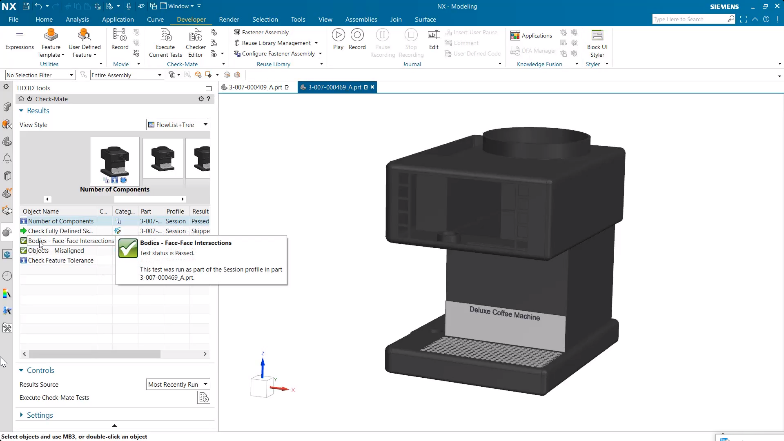
Rules-based checks inside the CAD system. These act more as automations than true AI. Typical checkers look for discrepancies in dimensions, fonts, layers, title blocks, views, standards compliance and basic modeling best practices.
Examples:
Strengths
- Fully integrated in the CAD UI and can run automatically on save or regenerate.
- Good at enforcing company / customer standards (dimensioning styles, text sizes, title blocks, layer names, etc.).
- Some can auto-fix issues (e.g., change dimension style to match the standard).
Weaknesses
- Setup can be heavy and is manual (defining rules, maintaining rule libraries).
- Mostly format/standards-focused, not “engineering intent” (e.g., they won’t tell you a part is impossible to machine).
- Typically locked to one CAD—not great for mixed-tool supplier ecosystems.
Best use cases
- Enforcing internal drawing standards before release.
- Automated checks in release workflows (e.g., run at ECO/ECR gate).
- Large CAD libraries where consistency matters more than one-off exceptions.
Ideal companies
- Small-to-midsize manufacturers with one primary CAD and a strong standards culture (aerospace, automotive, industrial equipment).
- Teams using a single PLM (Teamcenter, Windchill, 3DEXPERIENCE) who want checks embedded in their CAD/PLM release processes.
3: Inspection & Ballooning / FAI Tools
What they do
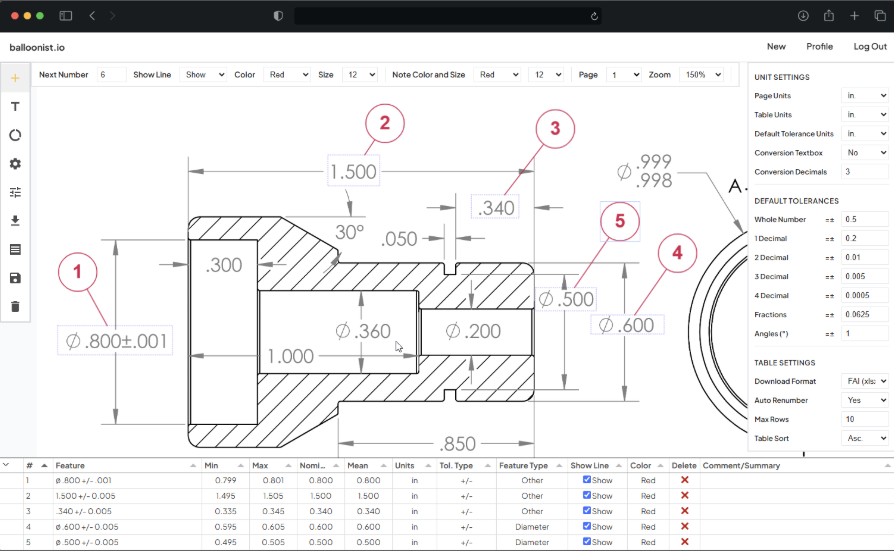
Automatically balloon drawings, extract dimensions/GD&T via OCR/PMI, and generate inspection plans and reports (AS9102, PPAP, in-process inspection).
Examples:
- SOLIDWORKS Inspection (add-in + standalone)
- High QA Inspection Manager / Auto-Ballooning
- DISCUS Desktop + IDA
- Balloonist.io
- GroundControl
Strengths
- Huge time saver vs manual ballooning and Excel inspection sheets; often 50–80% time reduction claimed.
Good support for FAI/AS9102/PPAP and other standard forms. - Handles legacy PDFs/TIFFs as well as native CAD drawings.
Weaknesses
- Focus is inspection documentation, not improving the design itself.
- If the drawing is wrong or unclear, they will faithfully propagate that into inspection: garbage in, garbage out.
- Usually another system for quality/inspection to own (integration effort with QMS/ERP).
Best use cases
- Creating ballooned drawings + inspection reports for:
- FAI / AS9102
- PPAP/APQP
- Incoming / in-process inspection.
- High-mix manufacturing where inspection planning is a bottleneck.
Ideal companies
- Aerospace & defense, medical devices, automotive tier suppliers who have strict regulations and standards they must adhere to.
- Job shops that do contract manufacturing for heavily regulated customers and need to turn FAIs quickly.
4: Collaborative Review Tools
What they do
Provide a shared space to view drawings, mark them up, compare revisions, and manage comments/approvals.
Examples:
- Bluebeam Revu for QA/QC and document comparison
- CoLab Design Engagement System (CAD + drawing review, with AI and structured issue tracking)
- Generic PDF tools (Acrobat, etc.) with comments/markups
Strengths
- Easy for non-CAD users (manufacturing, suppliers, quality, purchasing).
- Good visual tools: overlays, side-by-side compare, document history, and in Bluebeam’s case robust QA/QC workflows.
- Solutions like CoLab add structured issue tracking, audit trails, and PLM integration tailored to engineering reviews.
Weaknesses
- Largely manual—they don’t automatically know if a dimension violates a standard.
- Need process discipline to ensure comments get resolved and closed out.
Best use cases
- Cross-functional drawing reviews (design, manufacturing, quality, suppliers).
- Remote or multi-site teams doing digital instead of paper redlines.
- Formal signoff workflows where an audit trail of comments + resolutions is mandatory.
Ideal companies
- Any org moving from email + PDFs + paper redlines to something more structured.
- OEMs with distributed design and manufacturing teams, or heavy supplier collaboration.
5: DFM / Manufacturability & Quoting Tools
What they do
Analyze geometry (primarily 3D CAD, sometimes assisted by drawings) to flag manufacturability risks and help estimate cost/lead time.
Examples:
- CoLab (Peer check for DFM issues and costing based on standards and guidelines)
- Paperless Parts (quoting + manufacturability analysis)
- CAD + CAM environments (Fusion, etc.) with built-in manufacturability checks.
Strengths
- Surface DFM issues early: bend radius violations, thin walls, deep pockets, etc.
- Great for quoting teams: quickly see risky features and adjust pricing or ask for design changes.
Weaknesses
- Model-first; drawing checks are usually secondary (viewer + notes).
- Less focused on drafting standards; more on “Can we actually make this?”
Best use cases
- Job shops and contract manufacturers reviewing customer drawings/models for quoting.
- Design teams who want fast manufacturability feedback during early design.
Ideal companies
- High-mix, low-volume manufacturers where quoting speed and DFM feedback are critical.
- Shops doing a lot of sheet metal and machined parts with complex geometry.
.avif)
AI checks for technical and manufacturing drawings
The required checks depend on the part, process and release package. Software that performs well on one clean machined-part drawing may not provide the same coverage for assemblies, castings or regulated drawing sets.
Machined parts
Relevant checks may include hole and thread callouts, feature dimensions, internal radii, deep pockets, tool access, surface finishes and tolerances that could add unnecessary manufacturing cost.
Sheet-metal parts
Relevant checks may include material and thickness, bend radius, bend relief, hole-to-edge clearance, formed dimensions and whether the specified geometry is compatible with the intended forming process.
Castings
Relevant concerns may include wall-thickness transitions, draft, fillets, machining allowances, ribs, bosses and whether the drawing differentiates cast and machined surfaces.
Molded parts
Potential checks include wall uniformity, draft angles, rib and boss geometry, undercuts, material requirements and features that may require slides or create tooling risks.
Assemblies
Assembly checks may require BOM quantities, balloon references, interface dimensions, fastener callouts, mating requirements and consistency between assembly and component drawings.
Regulated release packages
Software may assist with standards checks, issue traceability and inspection-document generation, but it does not replace the organization’s approved configuration-management, design-control, quality or release procedures.
How to choose the right drawing-checking software
Evaluate software against the specific review failure you need to prevent.
File and CAD support
Confirm the native CAD versions, drawing formats, PDFs, neutral files and scanned documents the product accepts. Determine whether it receives structured engineering data or only a flattened image.
2D and 3D coverage
Establish whether the product evaluates drawing annotations, model geometry or both. A drawing checker and a 3D DFM analyzer should not be treated as equivalent.
Deterministic and judgment-based checks
Ask which findings come from fixed rules and which are generated recommendations. The software should make that distinction clear to the reviewer.
GD&T and standards support
Test the tool against representative feature-control frames, datum structures, company conventions and known problem drawings. Symbol recognition alone does not establish correct GD&T application.
Company-specific standards
Determine how checklists, internal drafting practices, supplier requirements and lessons learned are added, updated and cited during a review.
Traceability and disposition
A finding should remain connected to its design location, reviewed revision, owner, status and resolution. This is especially important when automated findings enter a human approval process.
PDM, PLM and release integration
Confirm how the correct design revision enters the review and how resulting actions connect back to the authoritative lifecycle process. CoLab, for example, supports connected review workflows for systems including Windchill, Teamcenter, 3DEXPERIENCE and SOLIDWORKS PDM.
See how PLM-integrated design review can provide supplier and cross-functional access without moving lifecycle authority out of PLM.
Mixed-CAD and supplier access
Determine whether reviewers require a CAD or PLM license, how supplier permissions are controlled and whether the workflow supports files from more than one authoring system.
Security and deployment
Review access controls, encryption, certifications, data residency, model-training practices and deployment requirements before uploading proprietary or regulated engineering information.
Validation and human review
Test the tool against representative drawings containing both known issues and acceptable exceptions. Measure false positives, missed findings and the time engineers need to verify the output.
Where CoLab AutoReview fits
CoLab AutoReview is an AI-assisted peer checker within CoLab’s engineering design-review workflow.
For 2D drawings, it is intended to perform a first-pass review for issues such as incomplete callouts, conflicting information, dimensional or GD&T concerns, title-block problems, BOM inconsistencies and deviations from company standards. For 3D models, AutoReview also supports process-specific geometry and DFM checks.
Each finding is added as contextual feedback on the drawing or model. Engineers can then validate it, reject it, assign it and track any resulting change through resolution.
AutoReview does not replace:
- CAD-native checkers for every deterministic drafting or modeling condition
- Drawing-generation software
- Inspection ballooning and FAI systems
- PLM as the authoritative lifecycle record
- The engineer responsible for the final design and release decision
It is best suited to teams that want automated and human findings to move through the same review and disposition process rather than producing another disconnected report.
Watch the AutoReview first-pass drawing-check demo to see material, BOM, angular-tolerance and GD&T-related findings placed directly on a 2D drawing.
Limitations of AI drawing review
All drawing-checking categories have limitations. The purpose of AI is not to replace engineering knowledge or transfer responsibility for the design to software.
Engineers must still:
- Make judgment calls when requirements conflict or tradeoffs are unclear
- Validate engineering intent across parts, assemblies and systems
- Interpret functional requirements
- Apply knowledge that has not been captured in rules or documentation
- Resolve disagreements among design, manufacturing, quality and suppliers
- Own risk assessment and the final release decision
Teams should also account for several specific limitations.
False positives and missed findings
An AI checker may flag an acceptable exception or fail to identify a concern an experienced reviewer would catch. The quantity of findings is not, by itself, a measure of review quality.
Incomplete or ambiguous source information
Software cannot reliably determine the correct answer when requirements are missing, illegible, contradictory or divided among disconnected documents.
Company-specific standards
Internal standards may include exceptions or unwritten practices that must be documented before they can be applied consistently.
Model and drawing context
A drawing may not contain enough geometry for a full DFM evaluation. A model may not contain every note, contractual requirement or inspection instruction shown on the drawing.
Functional intent
An isolated component drawing may not provide enough context to evaluate complete assembly function, tolerance stacks, failure modes or system-level tradeoffs.
Conflicting requirements
Cost, supplier capability, performance, manufacturability, serviceability and schedule may point to different decisions. Software can identify the conflict but should not own the tradeoff.
AI drawing review should function as a checking and decision-support tool, not as the release authority.
Learn More About Emerging AI Drawing Check Tools
Selecting the right tool depends primarily on:
- The job to be done
- The team’s review process
- The balance between 2D drawing and 3D model checks
- The CAD and PLM environment
- The standards and regulations involved
- The required level of review traceability
- Whether the output must support engineering review, inspection planning, supplier collaboration or quoting
Each category provides value under the right circumstances. Understanding the differences helps engineering teams avoid buying a tool that addresses the wrong stage of the workflow.
If your team needs to automate first-pass drawing checks, identify DFM concerns and apply company standards during review, CoLab AutoReview is built for that workflow. It evaluates 2D drawings and native CAD data, places findings on the design and connects them to a structured review process.
Schedule a consultation with a CoLab product expert to evaluate the right drawing-checking tool or combination of tools for your engineering process.



Frequently Asked Questions
What is the best AI tool for engineering drawings?
The best tool depends on the task.
CoLab AutoReview is designed for AI-assisted review of engineering drawings and CAD models. CAD-native tools such as SOLIDWORKS Design Checker, Creo ModelCHECK and NX Check-Mate are better suited to deterministic standards checks inside their respective authoring systems. Inspection tools are intended for characteristic extraction, ballooning and quality documentation.
The correct choice depends on whether the team needs engineering review, drafting enforcement, drawing generation, inspection automation, collaborative review or manufacturability analysis.
What is the difference between an AI drawing checker and a rules-based CAD checker?
A CAD rules checker compares the file against predefined conditions, such as approved dimension styles, title-block fields, layers or materials.
An AI drawing checker evaluates broader drawing content and relationships to flag potential omissions, conflicts or ambiguities that may not have been encoded as a deterministic rule.
The two categories are complementary.
Can AI check engineering drawings automatically?
Yes. AI-assisted systems can run a first-pass check and flag potentially missing callouts, ambiguous information, cross-sheet inconsistencies, DFM concerns, title-block errors and standards issues. An engineer must still verify each finding and decide whether the drawing should change.
What can an AI drawing checker detect?
An AI drawing checker may detect:
- Missing or incomplete dimensions
- Ambiguous tolerances
- Material or finish conflicts
- Title-block and revision problems
- Cross-sheet inconsistencies
- Potential GD&T concerns
- BOM or item-callout discrepancies
- Missing manufacturing information
- DFM risks
- Deviations from supplied internal standards
Exact coverage depends on the software, source format, available CAD data and company-specific configuration.
Can AI check GD&T?
AI can recognize GD&T information, identify potentially incomplete or inconsistent callouts and compare drawing content against supplied standards or guidelines.
It should not be assumed to validate complete datum strategy, assembly function or every interpretation of ASME Y14.5 or ISO GPS. Engineers must verify whether the GD&T communicates the required function and can be manufactured and inspected.
Is drawing OCR the same as drawing review?
No. OCR extracts information from a drawing. Drawing review evaluates whether that information is complete, consistent and appropriate.
An OCR system can accurately extract an incorrect or ambiguous requirement.
Can AI drawing checkers replace engineering peer review?
No. AI can complete repeatable first-pass checks and help reviewers focus on higher-risk questions. It cannot own functional tradeoffs, undocumented exceptions, risk acceptance or final approval.
The most practical workflow uses automated checks before human review, then records how engineers disposition each accepted finding.
About the author
Ryan McCarvill is SEO Content Manager at CoLab, bringing experience from both SaaS and creative agencies to drive content strategy and product storytelling.

