AutoReview: AI that catches design issues before they slip through the cracks
AutoReview analyzes your CAD, then adds markup and comments directly on the design, catching critical issues and helping you move faster.
AutoReview is your instant peer checker. Here’s what it can find:


.avif)

%20(1).avif)
.avif)
AutoReview is your instant peer checker. Here’s what it can find in seconds:
Inconsistencies in Technical Data
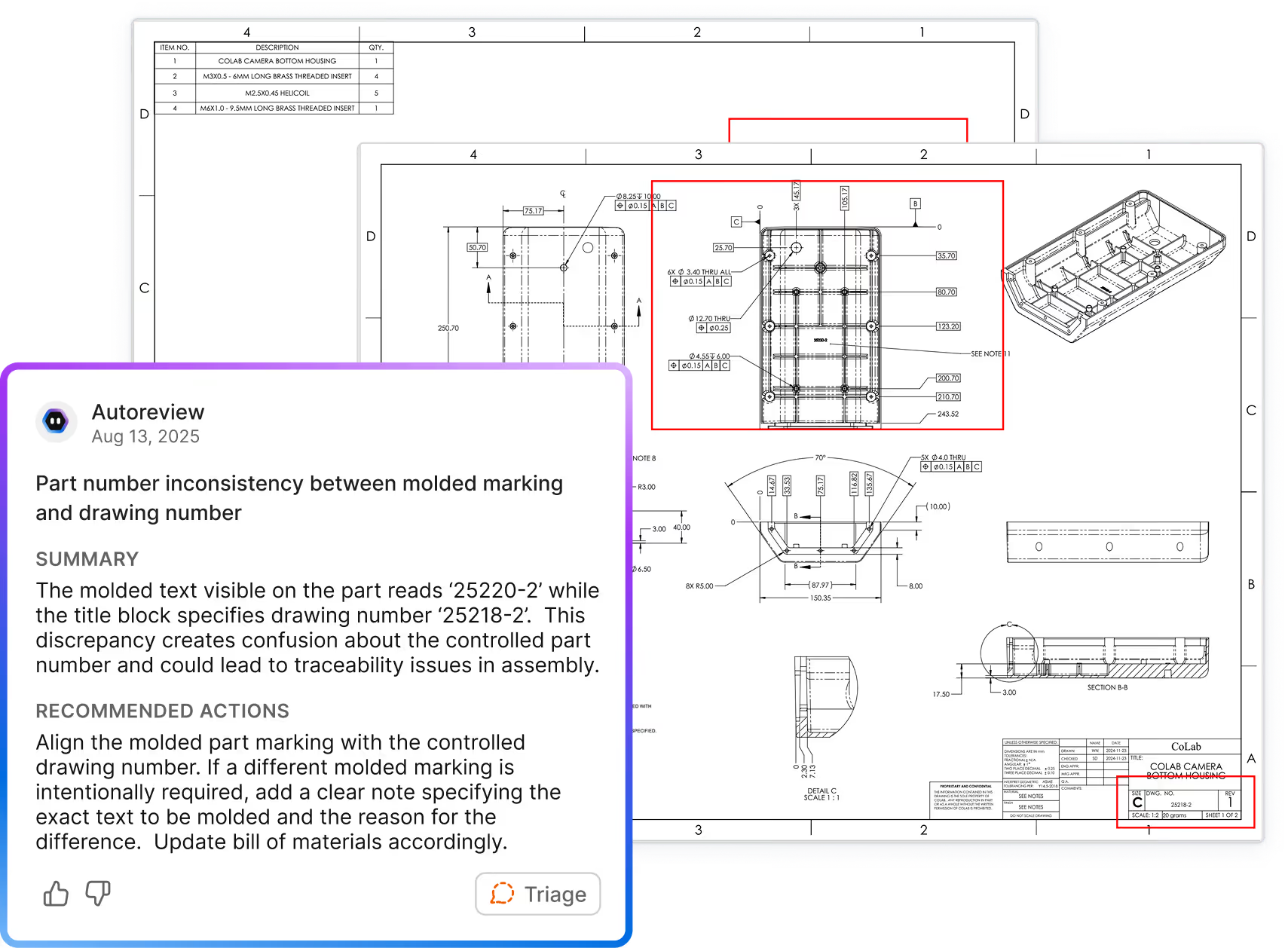
Mismatched materials, duplicate dimensions, title block discrepancies.

Ambiguous or Incomplete Drawings
Missing views, vague notes, unclear part configurations.

Design Flaws in 3D Parts
Sharp inside corners, unsupported ribs, stress-prone geometry.

Non-Conformance to Standards
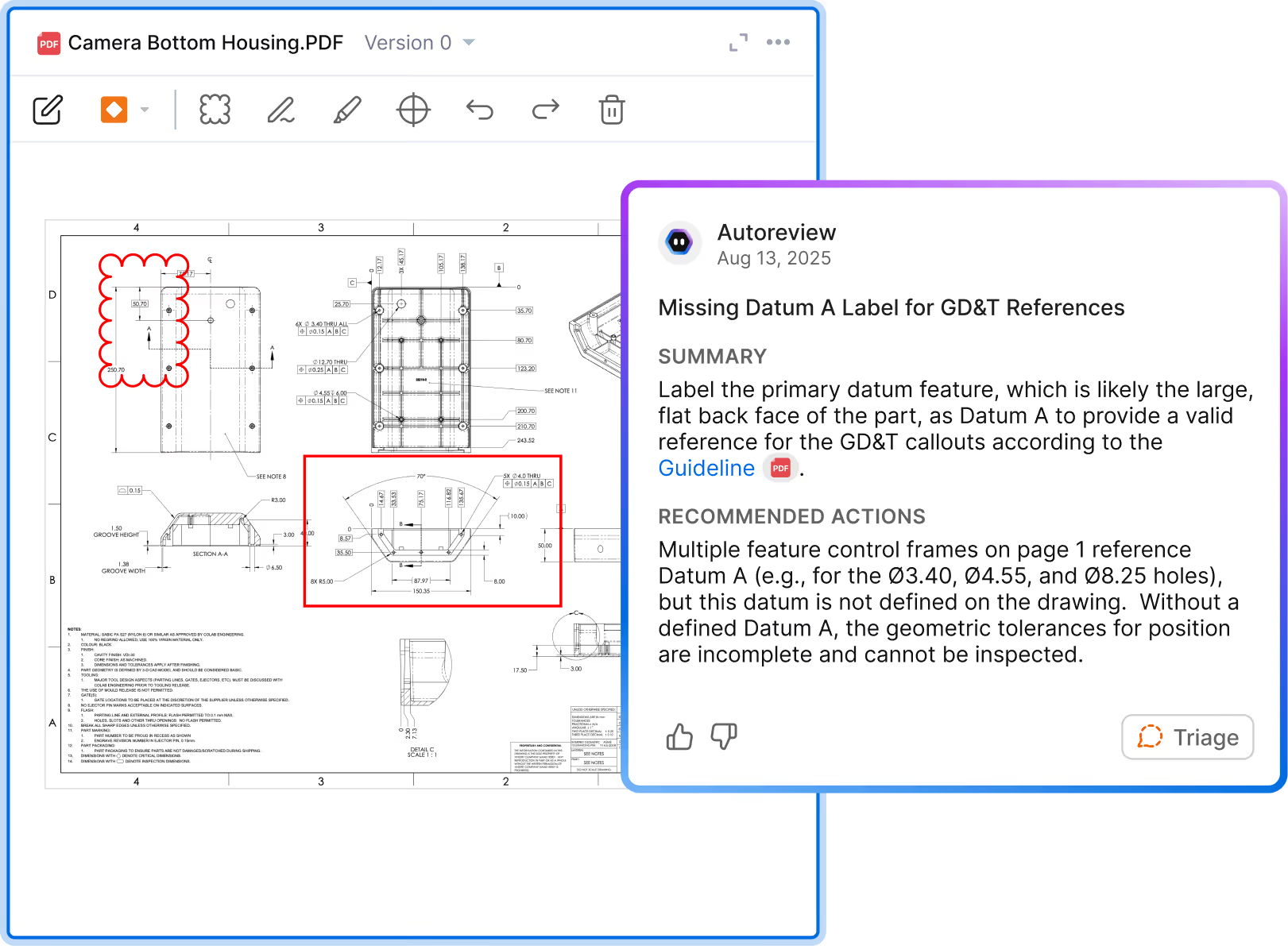
Missing tolerances, incorrect hole callouts, GD&T violations.

Conflicts with Lessons Learned
Repeat errors, common expert feedback, root causes of failures.

DFX Optimization
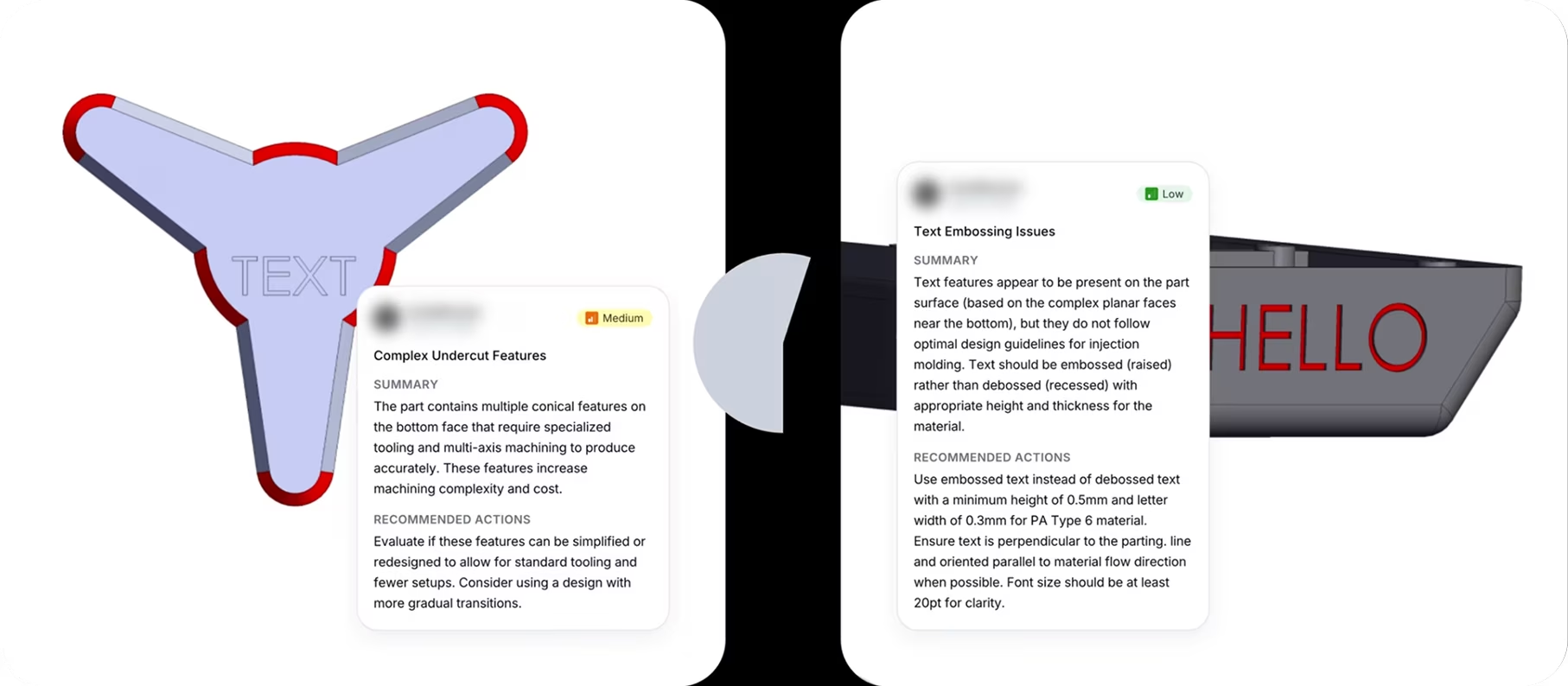
Thin walls, missing draft angles, complex parting lines in molded parts.

AutoReview uses specialized agents trained to find specific failure points

Drawing Review + Approval
GD&T: feature control frame syntax, datum strategy, standard compliance (ASME/ISO), functional application
Dimensional accuracy: conflicting values across views and tables, missing dimensions, tolerance specification and consistency
Drawing completeness: thread and fastener callouts, BOM and part-callout traceability, view layout and section integrity
DFM Analysis
CNC machining: depth-to-diameter ratios on blind and through holes, internal radii, thin walls, and features that create tool access problems
Sheet metal: bend radii, bend relief presence, hole-to-edge clearance, and whether the bend sequence can be formed without die collision
Injection molding: wall thickness uniformity, draft angles, rib and boss geometry against quantitative thresholds, and features that require slides or create weld line risk
See how it works
AutoReview uses your standards,checklists, and past feedback to give relevantguidance—aligned with how your team actuallyworks. AutoReview is ideal for workflows likedrawing reviews and approvals, surfacing lessonslearned and cross-functional collaboration.
Which markup is AI generated?

Why AutoReview?
Processes technical CAD data
AutoReview extracts and organizes the contents of your file before any review begins — geometry, dimensions, symbols, and metadata — so every check runs against real engineering context, not just a flat image.
Puts feedback in the design, not a document
AutoReview adds markups and comments directly to your 3D models and drawings with saved view states, so feedback is clear and actionable.
References your unique design guidelines
AutoReview references your organization's unique standards, guidelines, and review checklists. It reviews the way your team reviews, not just the way an LLM would.
Specialized agents, not a generic LLM
AutoReview uses specialized agents to find critical points of failure, producing more specific recommendations than general LLMs are capable of.
Fully integrated with CAD and PLM
With out-of-the-box integrations, you can share data directly from PLM to CoLab. AutoReview runs inside CoLab, so you can view CAD and people's comments right alongside AI-generated markups.
Enterprise-grade security, proven at scale
AutoReview runs inside CoLab’s secure infrastructure, which is already trusted by Fortune 500 manufacturers and vetted to standards like SOC 2 Type 2 and ISO 27001.
Frequently Asked Questions
How does AutoReview know what to look for—and will it work on our designs?
AutoReview applies two types of checks depending on your file type.
For 3D models, it runs deterministic checks against geometric properties, producing results based on direct geometric analysis.
For 2D drawings, AutoReview uses AI to evaluate content against your standards — flagging issues like dimensioning gaps, missing callouts, and tolerance inconsistencies based on what it reads from the drawing.
In both cases, you can extend what AutoReview evaluates by adding your own standards, checklists, and lessons learned. Feedback and decisions captured in CoLab also carry forward, so results improve the more your team uses it.
For 3D models, it runs deterministic checks against geometric properties, producing results based on direct geometric analysis.
For 2D drawings, AutoReview uses AI to evaluate content against your standards — flagging issues like dimensioning gaps, missing callouts, and tolerance inconsistencies based on what it reads from the drawing.
In both cases, you can extend what AutoReview evaluates by adding your own standards, checklists, and lessons learned. Feedback and decisions captured in CoLab also carry forward, so results improve the more your team uses it.
Is it secure?
Yes. AutoReview runs inside CoLab’s secure infrastructure, which meets enterprise-grade standards including SOC 2 Type 2 and ISO 27001. It’s already trusted by engineering teams at Fortune 500 manufacturers. Your data stays private and is never used to train public models or shared with other customers.
Do I need to prep our data or train it before we can use it?
AutoReview can perform a set of common design checks out of the box when you upload a model or drawing, using geometry, metadata, and drawing structure to help surface issues.
You can then refine how AutoReview evaluates designs by adding your standards, guidelines, checklists, and lessons learned. Human feedback, discussions, and design decisions captured during reviews provide additional context that guides future reviews.
Will it work with our CAD or PLM system?
Yes. You can upload files directly or push them in from your existing CAD or PLM tools using CoLab’s integrations. No custom setup required.
Did you create AutoReview to replace engineers?
AutoReview isn’t about replacing engineers—it’s about scaling the knowledge and experience they already have. The goal is to free up experts from repetitive tasks so they can focus on the work that actually needs their judgment. It’s a mindset shift: instead of thinking “this tool is doing my job,” it’s “this tool helps me get through the tedious parts faster so I can focus on the real engineering work.” The teams that win will be the ones that combine smart people with smart tools, not the ones that use AI to cut headcount.
When will I get access?
AutoReview is already available to initial customer cohorts, with access continuing to roll out to additional teams each week. Reach out to us to discuss access.
Want to try AutoReview on your own designs?
We store and process the data in this form to respond to your request.
For more information on how we use data, please refer to our Privacy Policy.
This sounds amazing—but is it good enough for my team to use right now?
The difference is that AutoReview took a few minutes vs a few days for the team to review the design for cost savings opportunities and generate feedback."
Sr. Value Management Engineer
The most impressive thing AutoReview has found on my projects to this point is an under dimensioned critical feature on a part with a suggestion to dimension based on the overall required tolerance stack."
Principal System Architect
The most impressive thing it has found has been several leads on cost saving possibilities for our Value Management team."
Sr. Manager Mechanical Design / CAD
Things like conflicting tolerances, incomplete material specs, or incompatible finishes. That combination of saving time and improving quality has made it a very impactful tool for us."
Director of Engineering